
HP 67, 67XL & 67XXL Ink Cartridges
HP 67 ink cartridges come as a black cartridge and a tri-colour cartridge. Genuine HP versions are available in standard 67 and high-yield 67XL sizes, and genuine combo packs pair black with tri-colour. Compatible options cover the 67XL tri-colour and a 67XXL black, which is the largest black size here for text-heavy printing. Our 4.8 Google Star rating shows that our customers consistently receive high-quality cartridges backed by reliable performance.
Printers Compatible with HP 67, 67XL & 67XXL Ink Cartridges


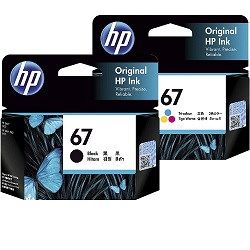

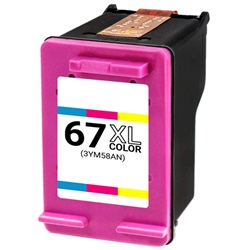
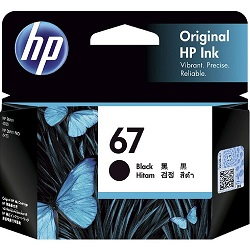
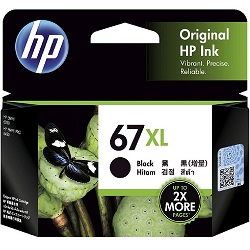


How many pages each HP 67 cartridge prints
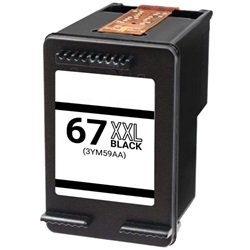
HP rates genuine 67 and 67XL inkjet yields under ISO/IEC 24711. The standard 67 black is rated at 120 pages, compared with 240 pages for the 67XL black. The tri-colour goes from 100 pages to 200 pages. The compatible 67XXL black is rated at 400 pages.
| Cartridge Number | Type | Colour | Page Yield | Cost Per Page |
|---|---|---|---|---|
| 67 | Standard | Black | 120 | $0.27 |
| 67 | Standard | Colour | 100 | $0.33 |
| 67XL | High Yield | Black | 240 | $0.21 |
| 67XL | High Yield | Colour | 200 | $0.26 |
Cost Per Page = Total Cartridge Price ÷ Page Yield (at 5% coverage). Prices based on Genuine cartridges.
Choose Between HP 67 & 67XL Ink Cartridges
Replace the Complete Colour Set
Time to replace them all? The 2-Pack 67 Genuine (from $63.63) includes one of each colour.
Print More with XL Cartridges
If you print often, the 2-Pack 67XL Genuine (from $101.08) gives the same colour coverage with more pages per cartridge and also qualifies for free delivery.
Replace Just One Colour
Running low on a single colour? A single Genuine 67 Black cartridge (from $31.93) replaces just that one.
Lower-Cost Compatible Options
If budget is the priority, compatible cartridges are a lower-cost alternative to genuine ink, with a single 67XL Colour cartridge from $28.37.
Reduce How Often You Replace Cartridges
If maximum yield matters most, the Compatible 67XXL Black Extra High Yield cartridge (from $29.73) offers the highest capacity available.
What to know about compatible 67XL and 67XXL cartridges
In our range, compatible versions cover the 67XL tri-colour and the 67XXL black. The 67XXL size is available only as a compatible, while the standard 67 cartridges and the 67XL black are supplied as genuine HP. Using a compatible cartridge does not by itself remove your rights under Australian Consumer Law. However, damage caused by a faulty cartridge may not be covered by the printer manufacturer's warranty. Our guide to genuine vs compatible cartridges explains the differences in more detail.
Choosing between 67, 67XL and 67XXL
If you print mainly text, the compatible 67XXL black is the highest-rated black option in this range at 400 pages. For regular colour pages or photos, choose the 67XL tri-colour, available in genuine or compatible form. Genuine 67 and 67XL combo packs suit buyers who prefer to replace black and tri-colour together. Compatible cartridges are backed by our money-back guarantee if they do not work, as set out in our returns policy. We ship from warehouses in Perth, Brisbane, Sydney, Melbourne and Adelaide. Free delivery applies on all orders over $99. See all HP ink cartridges.
Printers that take HP 67 cartridges
HP 67, 67XL and 67XXL cartridges are listed for the HP DeskJet 2330, DeskJet 2720e, DeskJet 2721e, DeskJet 2722e, DeskJet 2723e and DeskJet 4122e, as well as the Envy 6020, Envy 6030, Envy 6034e, Envy Pro 6420 and Envy Pro 6430.
Pro Tip
The genuine and compatible 67XL tri-colour cartridges share the same cartridge number, 3YM58AA, and the same 200-page rating. When ordering, check whether the listing says genuine or compatible rather than relying on the code alone.
Frequently Asked Questions
Can I switch from standard HP 67 to a 67XL or 67XXL black cartridge?
Yes. The 67, 67XL and 67XXL black cartridges are made for the same DeskJet and Envy printers listed on this page, so you can change size at your next replacement. The difference is the rated yield: 120, 240 and 400 pages respectively.
Which cartridge codes should I check when ordering HP 67 cartridges?
3YM56AA is the 67 black, 3YM55AA is the 67 tri-colour, 3YM57AA is the 67XL black and 3YM58AA is the 67XL tri-colour. The compatible 67XXL black is listed as 3YM59AA. The genuine packs combine these codes: 3YM55AA-6AA pairs the standard cartridges and 3YM57AA-8AA pairs the 67XL cartridges.
Is there a 67XXL tri-colour cartridge?
Not in this range. The 67XXL size is offered only as a compatible black cartridge rated at 400 pages. For colour, the highest-rated option is the 67XL tri-colour at 200 pages, available in genuine and compatible versions.
Is HP 67XL the same as HP 67 XL?
Yes. 67XL and 67 XL refer to the same high-yield HP cartridge. The space is only a formatting difference, and the same applies to 67XXL and 67 XXL.


