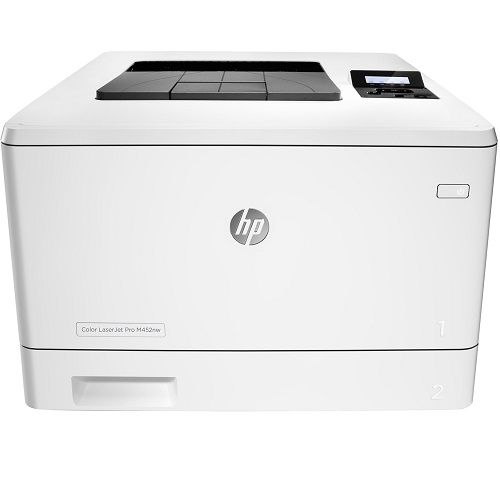
HP Color LaserJet Pro M452nw Colour Laser Wireless Printer
HP Color LaserJet Pro M452nw Colour Laser Wireless Printer
- Print
- up to 27ppm mono / clr
- up to 600 x 600 DPI
- Connectivity: USB 2.0, Ethernet, Wifi
- Paper Input: 250 sheets
- A4 printing
- 128MB Memory
- 12 Month Onsite Warranty
| Supported Operating Systems | |
| Compatible Operating Systems |
Windows OS compatible with In-Box Driver: Windows XP SP3 all 32-bit editions (XP Home, XP Pro, etc), Windows Vista all 32-bit editions (Home Basic, Premium, Professional, etc), Windows 7 all 32- & 64-bit editions, Windows 8/8.1 all 32- & 64-bit editions (excluding RT OS for Tablets), Windows 10 all 32- & 64-bit editions (excluding RT OS for Tablets) Windows OS compatible with Universal Print Driver (From HP.com): Windows XP SP3 32- & 64-bit editions (XP Home, XP Pro, etc), Windows Vista all 32- & 64-bit editions (Home Basic, Premium, Professional, etc), Windows 7 all 32- & 64-bit editions, Windows 8/8.1 all 32- & 64-bit editions (excluding RT OS for Tablets), Windows 10 all 32- & 64-bit editions (excluding RT OS for Tablets) Mac OS (HP Print Drivers available from http://www.HP.com and Apple Store): OS X 10.7 Lion, OS X 10.8 Mountain Lion, OS X 10.9 Mavericks, OS X 10.10 Yosemite Mobile OS (In-OS drivers): iOS, Android, Windows 8/8.1/10 RT Linux OS (In-OS HPLIP) SUSE Linux (12.2, 12.3, 13.1)nbsp; Fedora (17, 18, 19, 20)nbsp; Linux Mint (13, 14, 15, 16, 17)nbsp; Boss (3.0, 5.0)nbsp; Ubuntu (10.04, 11.10, 12.04, 12.10, 13.04, 13.10, 14.04, 14.10)nbsp; Debian (6.0.x, 7.x)nbsp; Other OS: UNIX |
| Compatible Network Operating Systems |
Windows OS compatible with In-Box Driver: Windows Server 2003/2003 R2 32-bit (SP1/SP2) Standard/Enterprise (+ Cluster & Terminal Services), Windows Server 2008 32-/64-bit (SP2) Standard/Enterprise (+ Cluster & Terminal Services), Windows Server 2008 R2 64-bit (SP1) Standard/Enterprise (+ Cluster & Terminal Services) Windows OS compatible with Universal Print Driver (UPD) or Product-Specific drivers from HP.com: Windows Server 2003/2003 R2 32-/64-bit (SP1/SP2) Standard/Enterprise/Datacenter (+ Cluster & Terminal Services), Windows Server 2008/2008 R2 32-/64-bit (SP1/SP2) Standard/Enterprise/Datacenter (+ Cluster & Terminal Services), Windows Server 2012/2012 R2 64-bit Standard/Foundation/Essentials/Datacenter (+ Cluster & Terminal Services) Citrix (on Windows Server 2003/2003R2): Citrix MetaFrame Presentation Server, 3.0, Citrix MetaFrame XP Presentation Server (Feature Release 1, 2, and 3), Citrix Presentation Server 4.0/4.5, Citrix XenApp 5.0 (Plus Feature Pack 2 & 3) Citrix (on Windows Server 2008/2008R2): Citrix XenApp 5.0 (Plus Feature Pack 2 & 3), Citrix XenApp 6.0/6.5/7.5, Citrix XenDesktop 5.6/7.0/7.5 Citrix (on Windows Server 2012/2012R2): Citrix XenApp 7.5, Citrix XenDesktop 7.0/7.5 Novell Servers (http://www.novell.com/iprint): Novell iPrint Appliance v1.0, Novell Open Enterprise Server 11/SP1, Novell Open Enterprise Server 2 for Linuxnbsp; NetWare 6.5/SP8nbsp; Novell Clients (http://www.novell.com/iprint)nbsp; Windows 8 (32-bit / 64-bit) recommend v5.86+, 8.1 recommend v5.94+, Windows 7 (32-bit / 64-bit) recommend v5.82+, Windows Vista (32-bit / 64-bit) recommend v5.82+, Windows XP / SP3 (32-bit only) recommend v5.82+ |
| Operating System (Supported Note) |
Not all "Compatible Operating Systems" are supported with inbox software Full solution software available only for Windows 7 Legacy Windows Operation Systems (XP, Vista, and equivalent servers) get print and Scan drivers only Windows 8 and 10 have apps available in MS App Store Windows RT OS for Tablets (32- & 64-bit) uses a simplified HP print driver built into the RT OS UNIX modelscripts are available on HP.com (Modelscripts are printer drivers for UNIX operating systems)nbsp; Linux systems use in-OS HPLIP software |
| Operating System Supported Footnote Number | [10] |
| Advanced Features | |
| Energy Savings Feature Technology |
HP Auto-On/Auto-Off Technology Instant-on Technology |
| Printer Smart Software Features | N-up printing, collation, HP ePrint, Apple AirPrint™, Mopria certified, Google Cloud Print, wireless direct printing, HP Auto-On/Auto-Off Technology, Job Storage with PIN printing |
| Printer Smart Software Features Footnote Number | [2] |
| Processor | |
| Processor Speed | 1200 MHz |
| Printing Media Handling | |
| Maximum Input Capacity (Sheets) | Up to 850 sheets (with Optional 550-sheet tray) |
| Input Capacity | Up to 300 sheets |
| Standard Input Capacity (Envelopes) | Up to 15 |
| Media Type And Capacity, Tray 1 |
Sheets: 50 envelopes: 5 |
| Media Type And Capacity, Tray 2 |
Sheets: 250 envelopes: 10 |
| Media Type And Capacity, Tray 3 | Sheets: 550 |
| Maximum Output Capacity (Sheets) | Up to 150 sheets |
| Output Capacity | Up to 150 sheets |
| Standard Output Capacity (Envelopes) | Up to 20 envelopes |
| Paper Handling Input, Optional | Optional 550-sheet tray |
| Paper Handling Input, Standard | 50-sheet multipurpose tray, 250-sheet input tray |
| Paper Handling Output, Standard | 150-sheet output bin |
| Print Area | |
| Bottom Margin (A4) | 4.23 mm |
| Left Margin (A4) | 4.23 mm |
| Right Margin (A4) | 4.23 mm |
| Top Margin (A4) | 4.23 mm |
| Print Resolution | |
| Print Quality Black (Best) | 600 x 600 dpi, Up to 38,400 x 600 enhanced dpi |
| Print Quality Black (Normal) | 600 x 600 dpi, Up to 38,400 x 600 enhanced dpi |
| Print Quality Color (Best) | 600 x 600 dpi, Up to 38,400 x 600 enhanced dpi |
| Print Resolution Color (Normal) | 600 x 600 dpi, Up to 38,400 x 600 enhanced dpi |
| Print Resolution Technologies | HP ImageREt 3600, PANTONE® calibrated |
| Box Contents | |
| What'S In The Box |
HP Color LaserJet Pro M452nw 4 preinstalled Introductory HP 410A LaserJet Toner cartridges (Black, Cyan, Magenta, Yellow: ~1200 pages) In-box documentation (Getting Started Guide, Install Poster) Software drivers and documentation on CD-ROM Power cord USB cable |
| Print Time | |
| First Page Out Black (A4, Ready) | As fast as 9.0 sec |
| First Page Out Black (A4, Sleep) | As fast as 11.4 sec |
| First Page Out Color (A4, Ready) | As fast as 9.9 sec |
| First Page Out Color (Letter, Ready) | As fast as 9.5 sec |
| First Page Out Color (Letter, Sleep) | As fast as 11.4 sec |
| First Page Out Color (A4, Sleep) | As fast as 11.5 sec |
| First Page Out Black (Letter, Ready) | As fast as 8.9 sec |
| First Page Out Black (Letter, Sleep) | As fast as 11.3 sec |
| First Page Out Footnote Number | [16] |
| Storage Specifications | |
| Storage | Optional Job storage via external rear host USB port (Minimum 16 GB) |
| Storage Footnote Number | [2] |
| Memory | |
| Memory | 256 MB NAND Flash, 128 MB DRAM |
| Maximum Memory | 256MB NAND Flash, 128MB DRAM |
| Display Specifications | |
| Display | 2-line backlit LCD graphic display |
| Display Area (Metric) | 44 x 12 mm |
| Connectivity And Communications | |
| Ports |
1 Hi-Speed USB 2.0 1 Gigabit Ethernet 10/100/1000 Base-TX 1 Easy-access USB |
| Network Protocols, Supported |
TCP/IP, IPv4, IPv6 Print: TCP-IP port 9100 Direct Mode, LPD (raw queue support only), Web Services Printing, HP ePrint, Apple AirPrint™, Google Cloud Print 2.0, Mopria, FTP Print, IPP Print Discovery: SLP, Bonjour, Web Services Discovery IP Config: IPv4 (BootP, DHCP, AutoIP, Manual), IPv6 (Stateless Link-Local and via Router, Statefull via DHCPv6), SSL Security and Certificate management Management: SNMPv1, SNMPv2, SNMPv3, HTTP/HTTPS, Syslog, FTP FW Download |
| Network Ready | Standard (built-in Gigabit Ethernet, Wi-Fi) [Operates as both an AP (with Wi-Fi Direct) and STA] |
| Network Capabilities |
Yes, via built-in 10/100/1000Base-TX Ethernet, Gigabit Auto-crossover Ethernet Authentication via 802.1X |
| Wireless Capability |
Yes, Built-in Wi-Fi Authentication via WEP, WPA/WPA2, WPA Enterprise Encryption via AES or TKIP WPS Wireless direct printing |
| Mobile Printing Capability |
HP ePrint Apple AirPrint™ Mopria™-certified NFC Touch-to-print Wireless Direct Printing Google Cloud Print 2.0nbsp; Mobile Apps |
| Connectivity, Standard |
Hi-Speed USB 2.0 port built-in Gigabit Ethernet 10/100/1000 Base-TX network port Easy-access USB |
| Hp Eprint Capability | Yes |
| Rack And Power Specifications | |
| Best Technical Electricity Consumption (Tec) | 1.111 kWh/Week |
| Number Of Users | 3-10 Users |
| Typical Electricity Consumption (Tec) Number | 1.515 kWh/Week (Energy Star), 1.407 kWh/Week (Blue Angel) |
| Typical Electricity Consumption (Tec) Footnote Number | [4] |
| Best Technical Electricity Consumption (Tec) Footnote Number | [13] |
| Weights | |
| Weight | 17.5 kg |
| Package Weight | 20.7 kg |
| System Components | |
| Control Panel |
2-line backlit LCD graphic display 5 buttons (Cancel, Select, Reverse, Right/Left arrows) LED indicator lights (Attention, Ready) |
| System Requirements | |
| Minimum System Requirements For Macintosh |
Mac OS X v 10.7 or newer Internet USB or Network connection 1 GB available hard disk space |
| Minimum System Requirements |
Windows XP (SP2) (32-bit) or newer 233 MHz processer or higher 512 MB RAM 400 MB available hard disk space CD-ROM or Internet USB or Network connection |
| Security Management | |
| Security Management |
Embedded Web Server: password-protection, secure browsing via SSL/TLS Network: enable/disable network ports and features, SNMPv1 & SNMPv2 community password change HP ePrint: HTTPS with certificate validation, HTTP Basic Access Authentication, SASL authentication Firewall and ACL SNMPv3, 802.1X, Secure Boot, authentication via WEP, WPA/WPA2 Personal, WPA2 Enterprise Encryption via AES or TKIP |
| Software And Applications | |
| Software Included |
For Windows OS: HP Software Installer/Uninstaller, HP PCL 6 Printer Driver, HP Device Experience (DXP), HP Update, Product Registration Assist, HP Web Services Assist (HP Connected), HP Device Toolbox, HP Product Improvement Study, Online user manuals. (Software varies by OS: WinXP/Vista = driver only) Windows 7: Full solution Windows 8+ and newer: drivers only with more apps available in MS App store For Mac OS: Welcome Screen, (Directs users to http://www.HP.com or OS App Source for LaserJet Software) |
| Driver Updates | Software driver and Hardware Firmware is located at http://www8.hp.com/us/en/support.html |
| Mac Compatible | Yes |
| Downloadable Software |
From 123.hp.com: HP Easy Start (Guided Software Install for Windows and Mac) From HP.com for Windows OS: Full-solution software and drivers (Same solution as "Software Included"), HP PLC 6 print driver only, Product Documentation and Support From HP.com for Mac OS: Full-solution software and drivers For Mobile OS: See "HP Mobile Printing" (http://www8.hp.com/us/en/ads/mobility/overview.html) From In-OS app stores: HP recommended printer drivers and software From HP.com for printer administrators: Printer Administrator Resource Kit (Driver Configuration Utility, Driver Deployment Utility, Managed Printing Administrator), HP Universal Print Drivers (PCL6, PCL5 & PS for Windows), HP ePrint Software (ePrint Mobile Driver for Windows), Linux/Unix Print Drivers, SAP (PCL5 and PS Print Drivers), HP Web JetAdmin Software, HP Proxy Agent Software, HP Imaging and Printing Security Center |
| Printer Specifications | |
| Functions | |
| Automatic Paper Sensor | No |
| Storage Device And Direct Print Support | Storage devices not supported |
| Duplex Printing | Manual (driver support provided) |
| Duty Cycle (Monthly, Letter) | Up to 50,000 pages |
| Duty Cycle (Monthly, A4) | Up to 50,000 pages |
| Recommended Monthly Page Volume | 750 to 4000 |
| Envelope Feeder | No |
| Paper Trays, Maximum | 3 |
| Paper Trays, Standard | 2 |
| Print Colors | Yes |
| Print Languages | HP PCL 6, HP PCL 5c, HP postscript level 3 emulation, PDF, URF, PCLm, Native Office, PWG Raster |
| Printer Management |
Printer Administrator Resource Kit (Driver Configuration Utility, Driver Deployment Utility, Managed Printing Administrator) HP Web JetAdmin Software HP Proxy Agent Software HP Imaging and Printing Security Center HP Utility (Mac) HP Device Toolbox (Win 7) |
| Print Technology | Laser |
| Suresupply Supported | Yes |
| Fonts And Typefaces | 84 scalable TrueType fonts |
| Target User And Print Volume |
For teams up to 10 users Prints up to 4,000 pages/month |
| Suresupply Note |
HP SureSupply alerts you when your print cartridge is running low and helps you purchase online or locally through HP or a participating retailer. Only available with Original HP supplies Internet access required. To learn more, visit http://www.hp.com/go/SureSupply. |
| Suresupply Footnote Number | [9] |
| Recommended Monthly Page Volume Footnote Number | [8] |
| Duty Cycle Footnote Number | [7] |
| Print Speed | |
| Print Speed | Print speed up to 20 ppm (black) and 20 ppm (color) |
| Print Speed Duplex (A4) | Up to 24 ipm |
| Print Speed Duplex (Letter) | Up to 25 ipm |
| Print Speed Black (Landscape, A5) | Up to 49 ppm |
| Print Speed Black (Iso, Letter) | Up to 28 ppm |
| Print Speed Black (Iso, A4) | Up to 27 ppm |
| Print Speed Black (Portrait, A5) | Up to 7 ppm |
| Print Speed Duplex (A4) | Up to 24 ipm |
| Print Speed Duplex (Letter) | Up to 25 ipm |
| Print Speed Color (Landscape, A5) | Up to 49 ppm |
| Print Speed Color (Iso) | Up to 28 ppm |
| Print Speed Color (Iso) | Up to 27 ppm |
| Print Speed Color (Portrait, A5) | Up to 7 ppm |
| Print Speed (A4/Letter) Footnote Number | [14] |
| Print Speed Footnote Number (A5) | [15] |
| Dimensions | |
| Minimum Dimensions (W X D X H) | 412 x 453 x 295 mm |
| Package Dimensions (W X D X H) | 497 x 379 x 583 mm |
| Cartridges And Printheads | |
| Number Of Print Cartridges | 4 (1 each black, cyan, magenta, yellow) |
| Supplies Feature | HP JetIntelligence Cartridge |
| Replacement Cartridges |
HP 410A Black LaserJet Toner Cartridge (~2300 pages) CF410A HP 410X Black LaserJet Toner Cartridge (~6500 pages) CF410X HP 410A Cyan LaserJet Toner Cartridge (~2300 pages) CF411A HP 410X Cyan LaserJet Toner Cartridge (~5000 pages) CF411X HP 410A Yellow LaserJet Toner Cartridge (~2300 pages) CF412A HP 410X Yellow LaserJet Toner Cartridge (~5000 pages) CF412Xnbsp; HP 410A Magenta LaserJet Toner Cartridge (~2300 pages) CF413Anbsp; HP 410X Magenta LaserJet Toner Cartridge (~5000 pages) CF413X |
| Replacement Cartridges Footnote Number | [5] |
| Supported Printing Media | |
| Media Sizes Supported, Key |
10 x 15 cm A4 Envelopes |
| Media Sizes Supported, Key |
4 x 6 in Letter Legal Envelopes |
| Media Sizes, Custom |
Tray 1: 76 x 127 to 216 x 356 mm Tray 2, optional Tray 3: 100 x 148 to 216 x 356 mm |
| Media Sizes Supported |
Tray 1, Tray 2: A4, A5, A6, B5 (JIS), B6 (JIS), 16K (195 x 270 mm, 184 x 260 mm, 197 x 273 mm), 10 x 15 cm, Oficio (216 x 340 mm), postcards (JIS single, JIS double), envelopes (DL, C5, B5) Optional Tray 3: A4, A5, A6, B5 (JIS), B6 (JIS), 16K (195 x 270 mm, 184 x 260 mm, 197 x 273 mm), 10 x 15 cm, Oficio (216 x 340 mm), postcards (JIS single, JIS double) |
| Media Size, Tray 1 | A4, A5, A6, B5 (JIS), B6 (JIS), 16K (195 x 270 mm, 184 x 260 mm, 197 x 273 mm), 10 x 15 cm, Oficio (216 x 340 mm), postcards (JIS single, JIS double), envelopes (DL, C5, B5) |
| Media Size, Tray 2 | A4, A5, A6, B5 (JIS), B6 (JIS), 16K (195 x 270 mm, 184 x 260 mm, 197 x 273 mm), 10 x 15 cm, Oficio (216 x 340 mm), postcards (JIS single, JIS double), envelopes (DL, C5, B5) |
| Media Size, Tray 3 | A4, A5, A6, B5 (JIS), B6 (JIS), 16K (195 x 270 mm, 184 x 260 mm, 197 x 273 mm), 10 x 15 cm, Oficio (216 x 340 mm), postcards (JIS single, JIS double) |
| Media Types | Paper (bond, brochure, colored, glossy, letterhead, photo, plain, preprinted, prepunched, recycled, rough), postcards, labels, envelopes |
| Media Weight, Supported |
Tray 1: 60 to 176 g/m² (up to 200 g/m² with postcards and HP Color laser glossy photo papers) Tray 2: 60 to 163 g/m² (up to 176 g/m² with postcards, up to 200 g/m² HP Color laser glossy photo papers): optional Tray 3: 60 to 163 g/m² (up to 176 g/m² with postcards, up to 150 g/m² Glossy media) Tray 1: 60 to 176 g/m² (up to 200 g/m² with postcards and HP Color laser glossy photo papers) Tray 2: 60 to 163 g/m² (up to 176 g/m² with postcards, up to 200 g/m² HP Color laser glossy photo papers): optional Tray 3: 60 to 163 g/m² (up to 176 g/m² with postcards, up to 150 g/m² Glossy media) |
| Media Weight (Tray 1) | 60 to 176 g/m² (up to 200 g/m² with postcards and HP Color laser glossy photo papers) |
| Media Weight (Tray 2) | 60 to 163 g/m² (up to 176 g/m² with postcards, up to 200 g/m² HP Color laser glossy photo papers) |
| Media Weight (Tray 3) | Optional Tray 3: 60 to 163 g/m² (up to 176 g/m² with postcards, up to 150 g/m² Glossy media) |
| Battery And Power | |
| Power |
110-volt input voltage: 110 to 127 VAC (+/- 10%), 60 Hz (+/- 3 Hz) 220-volt input voltage: 220 to 240 VAC (+/- 10%), 50/60Hz (+/- 3 Hz) (Not dual voltage, power supply varies by part number with # Option code identifier) |
| Power Supply Type | Internal (Built-in) power supply |
| Power Consumption | 570 watts (Active Printing), 17.6 watts (Ready), 2.4 watts (Sleep), 0.6 watts (Auto-On/Auto-Off, via USB connectivity), 0.05 watts (Shutdown or Off) |
| Power Consumption Footnote Number | [3] |
| Warranty | |
| Warranty | 1 Year Limited Warranty (Return to HP/Dealer - Standard Bench Repair) |
| Notes |
[1] With toner cartridges [2] Job Storage feature requires a purchase of separate USB flash drive with a minimum of 16 GB capacity. [3] Power requirements are based on the country/region where the printer is sold. Do not convert operating voltages. This will damage the printer and void the product warranty. [4] Typical Electricity Consumption (TEC) rating represents the typical electricity consumed by a product during 1 week, measured in kilowatt-hours (kWh). [5] Printer ships with preinstalled introductory cartridges Black, Cyan, Magenta and Yellow (KCMY) (~1200 pages) with Auto Toner Seal Removal for all cartridges. [6] Acoustic values are subject to change. For current information see http://www.hp.com/support. Configuration tested: base model, simplex printing, A4 paper at an average of 27 ppm.nbsp; [7] Duty cycle is defined as the maximum number of pages per month of imaged output. This value provides a comparison of product robustness in relation to other HP LaserJet or HP Color LaserJet devices, and enables appropriate deployment of printers and MFPs to satisfy the demands of connected individuals or groups.nbsp; [8] HP recommends that the number of printed pages per month be within the stated range for optimum device performance, based on factors including supplies replacement intervals and device life over an extended warranty period.nbsp; [9] HP SureSupply alerts you when your print cartridge is running low and helps you purchase online or locally through HP or a participating retailer. Only available with Original HP supplies; Internet access required. To learn more, visit http://www.hp.com/go/SureSupply.nbsp; [10] Not all "Compatible Operating Systems" are supported with inbox software; Full solution software available only for Windows 7; Legacy Windows Operating Systems (XP, Vista, and equivalent servers) get print and Scan drivers only; Windows 8 and 10 have apps available in MS App Store; Windows RT OS for Tablets (32- & 64-bit) uses a simplified HP print driver built into the RT OS; UNIX modelscripts are available on http://www.HP.com (Modelscripts are printer drivers for UNIX operating systems); Linux systems use in-OS HPLIP softwarenbsp; [11] Without optional 550-sheet tray. Dimensions with optional 550-sheet tray: 16.2 x 17.8 x 16.7 in (412 x 453 x 425 mm)nbsp; [13] Typical Electricity Consumption (TEC) rating represents the typical electricity consumed by a product during 1 week, measured in kilowatt-hours (kWh).nbsp; [14] Measured using ISO/IEC 24734, excludes first set of test documents. For more information see http://www.hp.com/go/printerclaims. Exact speed varies depending on the system configuration, software application, driver, and document complexity.nbsp; [15] Measured using ISO/IEC 24734 Feature Performance Test, excludes first set of test documents. For more information see http://www.hp.com/go/printerclaims. Exact speed varies depending on the system configuration, software application, driver, and document complexity.nbsp; [16] Measured using ISO/IEC 17629. For more information see http://www.hp.com/go/printerclaims. Exact speed varies depending on the input voltage, system configuration, software application, driver, and document complexity.nbsp; [17] Declared cartridge yield value in accordance with ISO/IEC 19752. Actual yields vary considerably based on images printed and other factors. For more information, visit http://www.hp.com/go/learnaboutsupplies. HP Color LaserJet Pro M452 in-box cartridge may have higher yield than stated for printer units manufactured before 2017. |
When will my HP Color LaserJet Pro M452nw Colour Laser Wireless Printer be delivered?
We deliver Australia wide and have shipping distribution centres available to dispatch orders from all major cities including Melbourne, Sydney, Brisbane, Perth and Adelaide. With so many locations, the HP Color LaserJet Pro M452nw Colour Laser Wireless Printer along with any other items in your order will be delivered to your door normally within 1-2 business days. Same-day dispatch is often available to orders placed before 1pm. Delivery to rural locations may require extra time.
How much to deliver HP Color LaserJet Pro M452nw Colour Laser Wireless Printer?
We offer FREE delivery to our customers for orders over $99* in value. If your order does not exceed $99, we will only charge a small flat fee of $7.95 to deliver your order. Check our shipping page for more information.
What About my HP Color LaserJet Pro M452nw Colour Laser Wireless Printer quality?
Ink Depot stands by the quality of its products and has a reputation for supplying its customers with 5 star service. We will provide a full refund on any unsatisfactory product returned within 90 days of purchase*.
What payment methods do you support?
Our facilities accept payments by Visa, Mastercard, American Express, MasterPass, PayPal and Direct Bank Transfer. If you would like to pay with cheque, please notify us before sending.
 |
 |
 |
 |
 |
There are three things you need to know about ALL card payments at Ink Depot:
- there are no additional surcharges or fees
- we do not keep record of your card details on our servers at all - ever!
- card payments are processed on CommWeb or PayPal's secure servers - they are specialist financial services and utilise the best possible security for online shopping payments which includes sophisticated fraud detection systems to ensure your card details are not being misused. We do not compromise when it comes to the security of your card information.
Delivery information that you need to know
Orders are often dispatched within a few hours of being placed. We usually ship all orders within 24 hours of payment, unless the items are out of stock. Whilst 98% of the products advertised are held in stock, there may be an occasional item which needs to be specially ordered in from a manufacturer.
Delivery times may vary depending on the shipping method selected and the delivery address of your location. Delivery can be as quick as a few hours depending on your location. Major cities will often receive by the next business day but we recommend allowing 1-2 business days for delivery. Other regional areas may take slightly longer to receive. However, we use many different courier services which allow us to use the best possible delivery method for your location. If you have a preferred courier service, let us know and we will accommodate you where possible.
By default, we ask that orders are signed for. We understand that this is not always convenient but we do this to protect the goods you have ordered and it provides confirmation to us that the order has been received. If you are in a situation where you know that no one will be available to sign for the order, we offer an 'Authority to Leave' (ATL) service for orders below $250 in value. In these cases, the couriers will leave your consignment on your front door step unless you have specified an alternative location in the delivery instructions when placing your order. Ink Depot is unable to take responsibility for the order once it has been left by the courier in these situations as the goods are left at the customers own risk. A signature is not required for goods sent to PO Boxes but there may be delivery restrictions due to size and weight of the parcel. If the parcel cannot be sent to a PO Box due to its size, we will make contact with you and advise the next best possible option.
Related Cartridges