
Brother TN258, TN258XL Toner Cartridges
Brother TN258 and TN258XL toner cartridges provide variable capacity choices across standard and high-yield sizes to manage commercial text volumes, with premium compatible configurations and multi-packs cutting your overheads. Genuine replacements support small workgroups, while generic options drop hardware running costs significantly across matching colour laser setups. Our 4.8 Google Star rating shows that our customers consistently receive high-quality cartridges backed by reliable performance.
Printers Compatible with Brother TN258 Toner Cartridges


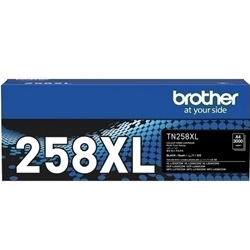


Expected page output and replacement cycles
Brother calculates official page capacities using continuous print passes mapped to strict ISO/IEC 19798 international testing criteria. Standard TN258 black and colour cartridges yield 1,000 pages, while upgrading to high-yield TN258XL components extends your production thresholds to 3,000 pages for black and 2,300 pages for each individual colour slot.
| Cartridge Number | Type | Colour | Page Yield | Cost Per Page |
|---|---|---|---|---|
| TN258BK | Standard | Black | 1,000 | $0.14 |
| TN258C | Standard | Cyan | 1,000 | $0.16 |
| TN258M | Standard | Magenta | 1,000 | $0.16 |
| TN258XLBK | High Yield | Black | 3,000 | $0.061 |
| TN258XLC | High Yield | Light Cyan | 2,300 | $0.084 |
| TN258XLM | High Yield | Light Magenta | 2,300 | $0.084 |
| TN258XLY | High Yield | Yellow | 2,300 | $0.084 |
| TN258Y | Standard | Yellow | 1,000 | $0.16 |
Cost Per Page = Total Cartridge Price ÷ Page Yield (at 5% coverage). Prices based on Genuine cartridges.
Genuine vs compatible cartridges
Swapping to compatible TN258XL toner cartridges lowers up-front procurement outlays by up to 48% compared to original retail pricing. Under Australian Consumer Law, using compatible cartridges does not void your printer warranty. These alternative options match your internal sensors perfectly to prevent tracking faults, and each one includes a complete money-back guarantee to safeguard your purchase if a chip mismatch happens. Learn more details in our full genuine vs compatible cartridges breakdown.
Best way to stock these cartridges
Office setups processing high invoice or document workloads drain the black toner slot multiple times faster than individual cyan, magenta, or yellow channels. Choosing a multi-pack or a high-capacity 5-pack or 10-pack of compatible TN258XL cartridges drops the cost-per-page to roughly three cents and ensures continuous print production. If you select an incorrect part number, you can swap it quickly under our Returns policy rules.
Orders are packed and dispatched daily from regional distribution points in Sydney, Melbourne, Brisbane, Adelaide, and Perth to shorten interstate transport times. Free delivery applies on all orders over $99 (conditions apply). To source matching consumables for different office hardware models, review our main Brother toner cartridges reference list.
Pro Tip
Standard TN258 and high-yield TN258XL cartridges have identical exterior dimensions and slide into the exact same slots inside your printer. You can run a high-yield TN258XLBK black cartridge alongside standard TN258 colour cartridges to match heavy document printing without paying for high-yield colour updates you do not require.
Frequently Asked Questions
Why does my printer show a "Replace Toner" message when the cartridge still contains powder?
Brother colour laser systems track consumption using an internal gear counter that counts page rotations rather than scanning real-time powder volume. Printing small text blocks can cause the counter to register a premature end-of-life status, which you can bypass by entering the printer reset menu using the LCD touchscreen panel and clearing that specific colour slot.
Can I install the high-yield TN258XL series into the basic HL-L3240CDW printer model?
Yes, the HL-L3240CDW accepts both standard TN258 and high-yield TN258XL sizes. The internal cartridge bays across all eight matching printer models are designed to fit the full-capacity XL housings seamlessly, meaning you do not need to buy a larger printer to use high-yield consumables.
Why are my text printouts showing faint vertical lines after inserting a new cartridge?
Faint vertical lines usually indicate that loose toner dust has settled on the primary corona wire inside the drum unit assembly. You can fix this immediately by sliding the built-in green cleaning tab located on the drum frame back and forth four times, which cleans the wire grid without requiring a replacement cartridge.


