
HP 804 & 804XL Ink Cartridges
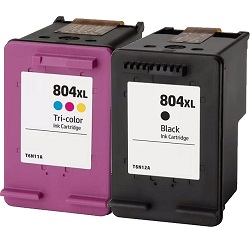
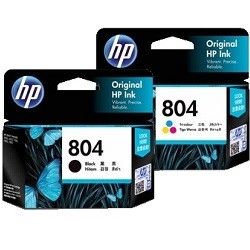
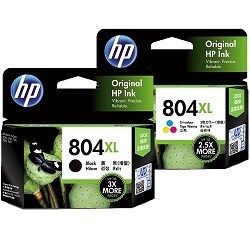
The HP 804 and 804XL cartridge system relies on an integrated printhead architecture that houses black and tri-colour inks in a compact, dual-slotted setup configuration. Because cyan, magenta, and yellow share a single chamber, uneven depletion of one hue means discarding the entire unit despite remaining reserves in the other colours. Switching from high-yield genuine to high-yield compatible cartridges saves 46% while renewing the physical firing mechanics during every single installation.
Printers Compatible with HP 804 Ink Cartridges


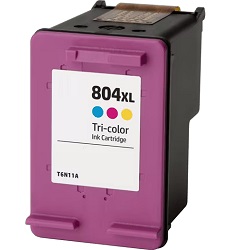
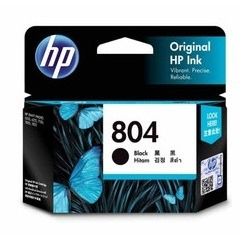


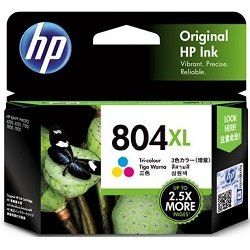
Bottom CMS
Expected page output and replacement cycles
This dual-cartridge ecosystem relies entirely on industry-standard testing frameworks to establish clear volume expectations. Page yields for the 804 and 804XL series are calculated under standard continuous testing conditions using the ISO/IEC 24711 international metric for A4 text documents. For users running mixed creative projects or heavy colour charts, the standard 165-page tri-colour ceiling drops substantially faster than the 200-page black counterpart. Stepping up to the high-capacity XL units moves expectations to 600 black pages and 415 colour pages, providing much greater running stability across variable document types.
| Cartridge Number | Type | Colour | Page Yield | Cost Per Page |
|---|---|---|---|---|
| 804 | Standard | Black | 200 | $0.14 |
| 804 | Standard | Colour | 165 | $0.24 |
| 804XL | High Yield | Black | 600 | $0.12 |
| 804XL | High Yield | Colour | 415 | $0.20 |
Cost Per Page = Total Cartridge Price ÷ Page Yield (at 5% coverage). Prices based on Genuine cartridges.
Genuine vs compatible cartridges
Opting for premium alternative options scales down operating expenses on these integrated heads without sacrificing performance markers. The compatible high yield alternatives replicate the physical electronic architecture of the original components, carrying a comprehensive money back guarantee to ensure hassle-free chip recognition and fluid delivery. Under Australian Consumer Law, using compatible cartridges does not void your printer warranty. Review the complete legislation framework regarding independent consumer choices directly via our genuine vs compatible cartridges information portal.
Choosing the right cartridge setup
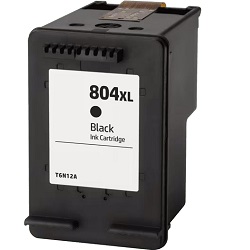
If you print mainly text documents, purchasing individual 804XL black cartridges keeps your monochrome workflows moving independently of your colour levels. If you print photos or complex graphics, choosing an 804XL twin-pack reduces the premium cost-per-drop associated with standard-capacity printing setups. Free delivery applies on all orders over $99 (conditions apply). To maintain rapid logistics across Australia, all orders ship directly from regional transit points located in Perth, Brisbane, Sydney, Melbourne, and Adelaide. Each purchase is backed completely by our transparent online returns policy. If you require consumables for a different machine model entirely, navigate to our complete index of HP ink cartridges.
Pro Tip
HP dual-cartridge printers execute micro-cleaning purges that rely on heavy suction every time a cartridge is physically unlatched and re-seated. If you encounter a minor faint line or light streak, avoid opening the top lid to check the cartridge; instead, run the software-based automated head cleaning utility from your computer tool menu to clear the micro-nozzles without draining large amounts of residual ink into the waste pad.
Frequently Asked Questions
Why does the tri-colour cartridge stop printing when my software shows one colour still has ink?
The 804 tri-colour block shares electronic circuitry across three separate internal ink reservoirs. When a single colour channel (such as cyan) is completely depleted, the thermal firing elements in that specific chamber overheat, causing the internal microchip to lock down the entire cartridge to protect the printer from circuit damage.
Can I run my printer using an 804XL high yield black cartridge alongside a standard 804 tri-colour cartridge?
Yes. The physical exterior dimensions of standard and XL sizes are entirely identical, meaning they insert into the same guide carriage slots. The printer firmware monitors ink levels via the built-in contact chips independently, allowing you to mix capacities based on your personal monochrome and colour usage ratios.
Why does my compatible 804XL cartridge show an "Ink Low" message immediately after installation?
This occurs because certain remanufactured chips retain the electronic memory footprint from their original factory lifecycle. The printer reads this legacy data flag, but it does not prevent physical printing; you can safely click through the dialogue warning prompt to proceed with your full high-yield page capacity.


