
The Best Printers To Consider For Home Usage In Australia
Posted on Wednesday 21 May, 2025
Finding the Perfect Printer for Your Home
Choosing the right printer for your home can be a daunting task, especially with the plethora of options available. In this guide, we've curated a list of the best home printers in Australia for 2025, categorised by specific needs.
- Best Overall Home Printer
- Best Budget Home Printer
- Best Photo Home Printer
- Best Ink-Tank Home Printer
- Best Laser Home Printer
- Best Printer for Home Office
- Best Home Printer for Speed
Best Overall Home Printer: Brother MFC-J6957DW Multifunction Colour Inkjet Wireless Printer (Duplex)
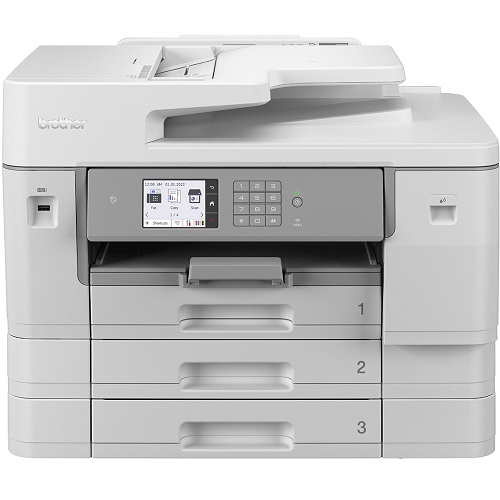
The Brother MFC-J6957DW is an excellent all-in-one printer for home offices and busy households that need reliable performance. It can print, scan, copy, and fax, making it a complete solution for everyday tasks. This printer supports A3 printing as well as standard A4, which is great for larger documents, reports, or creative projects. With wireless connectivity and automatic double-sided (duplex) printing, it helps save time and paper while delivering sharp text and vibrant colour prints.
Pros
All-in-one printer (print, scan, copy, fax)
Supports A3 and A4 printing
Automatic double-sided printing saves paper
Wireless printing from laptop or phone
Cons
Takes up more space due to larger size
Higher upfront cost compared to basic home printers
Ink costs can increase with heavy colour printing
Best Budget Home Printer: Epson WorkForce WF-2910 Multifunction Colour Inkjet Wireless Printer

The Epson WorkForce WF-2910 is a compact all-in-one printer that is great for everyday home use. It can print, scan, and copy, making it useful for school work, office documents, and basic colour printing. With wireless printing, you can easily print from your phone or laptop without needing cables. It’s a good option for users who want a simple printer for both black-and-white and colour printing.
Pros
Prints in both colour and black & white
All-in-one (print, scan, copy)
Compact size, fits well in small spaces
Cons
Not the best for heavy printing
Ink cartridges may need refilling/replacing often with regular use
Printing speed may feel slow for large documents
Best Photo Home Printer: Epson EcoTank ET-8550, Epson EcoTank Photo ET-8500

For stunning photo prints, the Epson EcoTank ET-8550 and Epson EcoTank Photo ET-8500 are top contenders. These ink tank printers offer high-quality prints, low running costs, and a wide range of paper sizes. However, their large size and initial cost may be a drawback for some.
Pros
Vibrant print quality
Large ink tank capacity
Versatile paper handling
Cons
Expensive upfront cost
Scanner doesn't support A3
Slower print speeds
Best Ink-Tank Home Printer: Brother MFC-J6540DW Multifunction Colour Inkjet Wireless Printer (Duplex)

The Brother MFC-J6540DW is a feature-packed all-in-one printer that is great for home offices and small businesses. It can print, scan, copy, and fax, making it a complete printer for daily work needs. It supports wireless printing, so you can print easily from your phone or laptop. It also comes with automatic duplex (double-sided) printing, which helps save paper and time. This printer is a good choice if you print regularly and want both colour and black-and-white printing.
Pros
All-in-one printer (print, scan, copy, fax)
Colour + black & white printing
Automatic double-sided printing saves paper
Cons
Takes more space compared to compact printers
Ink can run out faster with frequent colour printing
Higher cost compared to basic home printers
Best Printer for Home Office: HP Color LaserJet Pro MFP 3301 (NEW)

The HP Color LaserJet Pro MFP 3301 is a great all-in-one printer for home office use. It can print, scan, and copy, making it useful for daily work tasks. It delivers sharp text and bright colour prints, so your documents look clean and professional. This printer is a good option if you want a modern, reliable printer that handles regular office printing smoothly and saves time.
Pros
Prints in both colour and black & white
Great for home office and work documents
New model with updated performance
Cons
Higher price compared to basic printers
Toner can be expensive to replace
Larger than small home printers
Best Home Printer for Speed: Kyocera ECOSYS PA4500x

The Kyocera ECOSYS PA4500x is a fast and reliable printer that is perfect if you need quick black-and-white printing at home or in a home office. It is built for smooth performance and can handle large printing tasks without slowing down. This printer is a great option for users who print often and want high speed, sharp text, and long-lasting performance.
Pros
Very fast printing speed
Sharp and clear black-and-white prints
Great for regular and heavy printing
Strong and durable build quality
Cons
Only prints in black and white (no colour)
No scan or copy features
Takes more space than basic home printers
Toner replacement can be costly
Factors to Consider When Choosing a Home Printer
- Print Speed: How quickly the printer can produce prints.
- Print Quality: The clarity and sharpness of the printed output.
- Paper Handling: The printer's ability to handle different paper sizes and weights.
- Operating Costs: The cost of ink or toner cartridges.
- Noise Level: How quiet the printer is during operation.
- Ease of Use: The simplicity of setting up and using the printer.
- Software Compatibility: The printer's compatibility with various operating systems and software applications.
By considering these factors and the recommendations in this guide, you can find the perfect printer to meet your specific needs and budget.
Should I Get an All-in-One Printer, or a Single-Function Model? (NEW)
Choosing between an all-in-one printer and a single-function printer depends on what you need at home or in your home office.
Go for an All-in-One Printer if you need more than printing
An all-in-one printer can usually print + scan + copy (and sometimes fax). It’s a better option if you often work with documents and want everything in one machine.
Best for:
- Home office users
- Students and families
- Scanning IDs, forms, and paperwork
- Copying documents quickly
Example: HP Color LaserJet Pro MFP 3301 is a great all-in-one option for home offices.
Go for a Single-Function Printer if you only need fast printing
A single-function printer only prints, but it usually prints faster, takes less space, and is easier to manage. It’s perfect if your main goal is quick, no-fuss printing.
Best for:
- People who only print documents
- Users who want speed and simple setup
- Small desks or limited space
- Regular black-and-white printing
Example: Kyocera ECOSYS PA4500x is a great choice if speed is your main priority.
Quick tip: If you already have a scanner at home (or scan using your phone), a single-function printer can be enough. But if you need scanning and copying often, an all-in-one is the smarter choice.
Conclusion
The best printer for your home office depends on what you print and how often you use it. If you want an all-in-one printer for daily work tasks like printing, scanning, and copying, the HP Color LaserJet Pro MFP 3301 is a great pick. But if your main goal is fast black-and-white printing, the Kyocera ECOSYS PA4500x is a strong option for speed and performance.
Before you buy, think about your main needs, print speed, colour printing, wireless features, and running cost, so you choose a printer that fits your work style and budget.


Any comments?