
Best Home Printers In Australia

Buying a printer in Australia is not what it used to be. With the massive growth of NBN-powered home offices and the jump in supply costs, a cheap retail model often costs you the most over time. We analyzed the latest from Brother, HP, Epson and more to pick the true 2026 winners.
Our Strategy for the 2026 Lineup
We did not choose these models just by looking at the price tags. Our team used a data-heavy process to make sure these picks actually work for your wallet.
- The Yield-to-Cost Audit: We checked the Cost Per Page (CPP) by comparing manufacturer claims against ISO/IEC 24711 standards. This reveals which machines stay cheap over the years. Source: ISO/IEC 24711 Standards.
- Network Resilience: Most Aussie homes run on mesh Wi-Fi now. We picked printers with WPA3 security and Dual-band Wi-Fi to stop those annoying offline errors.
- Real Workflow: We looked for Single-pass Duplex Scanning. This scans both sides of a page at once, a must-have for anyone handling multi-page contracts.
- Best Overall: Brother MFC-J6957DW
- Best for Photo: Epson EcoTank ET-8550
- Best for Speed: Brother HL-L5210DW
- Best Budget: Epson EcoTank ET-2820
- Best Home Office: HP LaserJet MFP 3301
- Best True Ink-Tank: Epson EcoTank ET-4850
- 2026 Top Picks at a Glance
- Buying Mistakes to Avoid
- Printers to Avoid
- 7 Tips to Save Real Money
2026 Top Picks at a Glance
| Category | Winner | Key Strength |
|---|---|---|
| Best Overall | Brother MFC-J6957DW | Fast A3 versatility and high output |
| Best for Photo | Epson EcoTank ET-8550 | 6-colour system for gallery-grade prints |
| Best Budget | Epson EcoTank ET-2820 | Low-cost entry point with high-yield bottles |
| Best Home Office | HP Color LaserJet MFP 3301 | Professional text clarity for work documents |
| Best True Ink-Tank | Epson EcoTank ET-4850 | PrecisionCore tech with 250-sheet capacity |
| Best for Speed | Brother HL-L5210DW | 48ppm engine for high-output workflows |
Best Overall Home Printer: Brother MFC-J6957DW Multifunction Colour Inkjet Wireless Printer (Duplex)
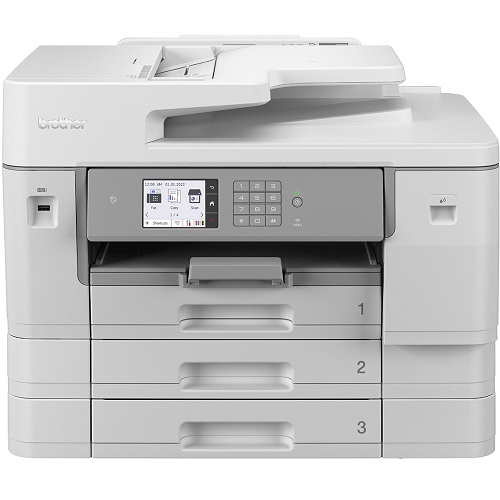
The Brother MFC-J6957DW is a total workhorse for the home. It handles full A3 printing for posters or plans and hits a 4.4-second first page out time very reliably. Keep in mind it is a big machine that needs a desk at least 60cm deep.
Pros
All-in-one (print, scan, copy, fax)
A3 and A4 printing in one machine
Automatic double-sided printing saves paper
Wireless printing from laptop or phone
Fast 4.4-second first page out time
Cons
Large footprint, needs 60cm+ desk depth
Higher upfront cost than basic models
Colour ink costs increase with heavy use
Best Photo Home Printer: Epson EcoTank ET-8550 Multifunction A3+ Inkjet Printer

The Epson EcoTank ET-8550 is perfect for families who print lots of photos. The 6-colour Claria system produces quality that matches a professional result. While the price starts from $879 AUD, the ink in the box can last up to two years.
Pros
6-colour Claria ink, gallery-grade photo output
Prints up to A3+ borderless
Ink in the box lasts up to 2 years average use
Refillable tanks, replace only the colour you use
Cons
High upfront cost (from $879 AUD)
Scanner maxes at A4 (no A3 scan)
Slower print speeds than office models
Large physical footprint
Best for Speed and Volume: Brother HL-L5210DW Mono Laser Printer

If you print huge stacks of black-and-white pages, this is your best bet. The Brother HL-L5210DW prints 48 pages per minute, the fastest mono laser in this roundup. Note that this is a monochrome printer only and does not scan or copy.
Pros
Blazing 48ppm print speed
Dual-band Wi-Fi and Gigabit Ethernet
Super-high-yield toner: 11,000 pages
Automatic duplex printing standard
Cons
Monochrome only, no colour printing
No scan or copy function
Overkill for light home use
Best Budget Home Printer: Epson EcoTank ET-2820 Wireless Inkjet Printer
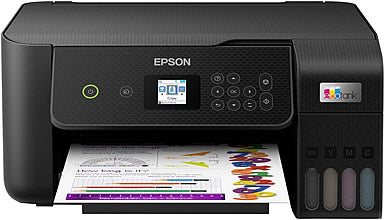
The Epson EcoTank ET-2820 is the best way to quit the cartridge trap on a budget. The heat-free technology keeps prints sharp even if the machine sits idle for weeks. It does not have an automatic document feeder, so you scan one sheet at a time.
Pros
Refillable ink tanks, no cartridge costs
Heat-free tech: ink stays fresh between uses
Print, scan, and copy all-in-one
Compact, fits easily on a small desk
Cons
No automatic document feeder (ADF)
Slower print speed, not for heavy use
No fax function
Best for Home Office: HP Color LaserJet Pro MFP 3301 Multifunction Printer
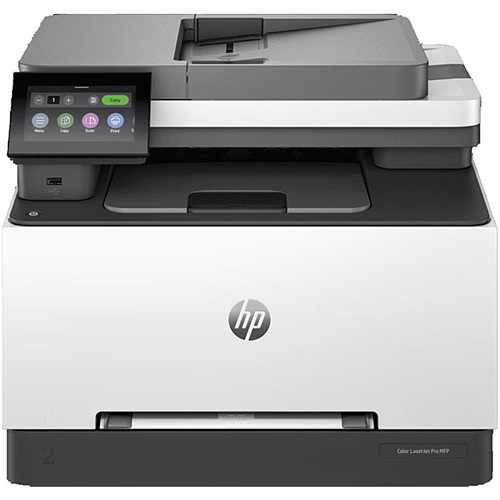
This laser is the gold standard for crisp work documents. The HP Color LaserJet Pro MFP 3301 toner will not smudge if you use a highlighter over it. Scanning is fast and the ADF handles thick contracts easily.
Pros
Smudge-proof laser output, highlighter safe
Fast ADF for multi-page contract scanning
25ppm colour and mono
No inkjet clogging, reliable after idle time
Cons
OEM toner is expensive, use compatible
Higher upfront cost than inkjet alternatives
Not suited for photo printing
Best True Ink-Tank Printer: Epson EcoTank ET-4850 All-in-One Printer

The Epson EcoTank ET-4850 bridges the gap between home and small business needs. It features a 250-sheet tray and a 30-page ADF for serious work, making it the most capable everyday all-in-one in this roundup.
Pros
Genuine refillable ink tank (not cartridges)
250-sheet front tray + 30-page ADF
Up to 7,500 black pages per ink set
Print, scan, copy, fax all-in-one
Cons
Higher upfront cost than budget inkjets
Larger footprint than compact models
No A3 printing (A4 maximum)
Critical Buying Mistakes to Avoid
Printers to Avoid in 2026
Expert Tips to Save Real Money
- The Font Strategy: Fonts like Times New Roman and Calibri use significantly less ink than bold fonts like Arial. Switching to an eco-font can save up to 25% on ink. Peer-reviewed research published in MDPI Sustainability shows that eco-fonts can reduce ink usage by up to 28%. Similarly, the University of Wisconsin-Green Bay saved nearly 30% on printing costs by switching their default font to Century.


Any comments?