
Best Label Makers in Australia 2026

Buyer’s Guide To Finding the Right Label Printer Easily
Trying to pick out a label printer can feel a bit overwhelming because there are just so many directions you could go. You’ve probably already noticed that searching for the “best” one does not really help much. It’s a lot like trying to pick the best vehicle; a compact car, a heavy-duty truck, and a van all serve totally different purposes.
The reality is that there is not a single “gold standard” machine that works for everyone. One person might need a rugged tool for a warehouse, while someone else just wants something small to organise their home office. The “perfect” printer is really just the one that matches up with exactly what you are trying to label. Instead of looking for the highest-rated model on the market, you are better off focusing on what your specific day-to-day needs actually look like.
In this guide, we have curated a list of the best label printers in Australia for 2026, categorised by your specific needs.
2026 Top Picks at a Glance
| Category | Winner | Key Strength |
|---|---|---|
| Best Budget | DYMO LabelManager 160P | Affordable handheld labelling with QWERTY keyboard |
| Best Colour | Brother VC-500W | Full-colour labels without ink cartridges |
| Best for Home | Brother PT-D210 | Easy organisation with durable laminated tapes |
| Best Portable | DYMO LetraTag 100H | Simple grab-and-go handheld design |
| Best for Shipping | DYMO LabelWriter 5XL | Fast 4 x 6 shipping labels for eCommerce |
| Best Wireless | Brother PT-P710BT | Bluetooth app-based label printing up to 24mm |
Best Budget Label Maker: DYMO LabelManager 160P
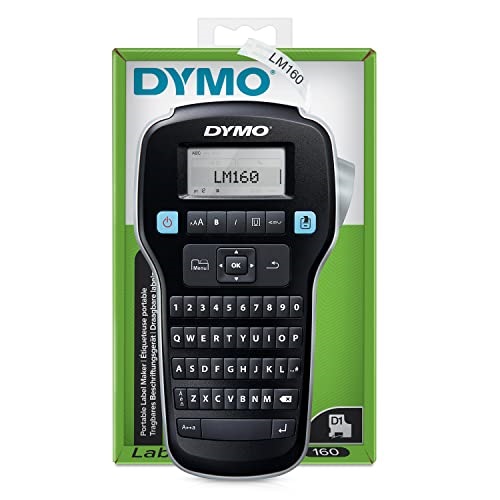
The DYMO LabelManager 160P handheld label maker features a QWERTY keyboard and easy-to-access formatting buttons. It is a desirable option for those who prefer a physical keyboard and require a portable device for general labelling purposes.
- Thermal transfer labeller
- Formats fast with one-touch smart keys
- Computer-style keyboard and large LCD display
- Powered by 6 x AAA batteries or AC adapter (not included)
- Prints on DYMO D1 label tape in 6, 9 and 12mm widths
- 180 dpi resolution
- LCD size: 2.5cm x 5cm
- Warranty: 24 month RTB, extended to 36 months upon registration
Pros
Large LCD display
Portable and lightweight
Variety of fonts and sizes
Cons
No backlit display
AC adapter sold separately
Limited connectivity
Best Colour Label Printer: Brother VC-500W

The Brother VC-500W stands out as a top colour label printer for its unique ZINK technology, eliminating the need for ink cartridges and making vibrant, full-colour label printing surprisingly accessible for a wider range of users compared to more expensive inkjet options.
- Thermal labeller
- Labels per minute: 8mm/sec
- 313 dpi resolution
- USB 2.0 and wireless connectivity
- Automatic cutter
- Warranty: 36 month return to base
Pros
No ink to replace
Easy to use
Visually appealing labels
Cons
Higher cost for label rolls
Slower print speed
Tricky surfaces may be difficult
Best Label Maker for Home Organisation: Brother PT-D210
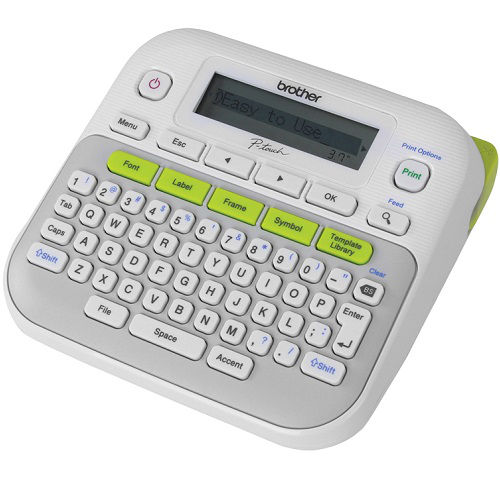
The Brother PT-D210 label maker offers a large display with plenty of fonts, symbols and templates. It is still relatively easy to use and prints on durable TZe laminated tapes, making it suitable for a wider range of labelling needs around the home.
- Thermal transfer ink labeller
- Up to 20mm/sec print speed
- Up to 180 dpi resolution
- Manual cutter
- 16 character x 2 line LCD
- 12 month return to base warranty
Pros
Portable and compact
Memory function saves time
Variety of tapes available
Cons
No backlit display
AC adapter sold separately
Limited connectivity
Best Portable/Handheld Label Maker: DYMO LetraTag 100H
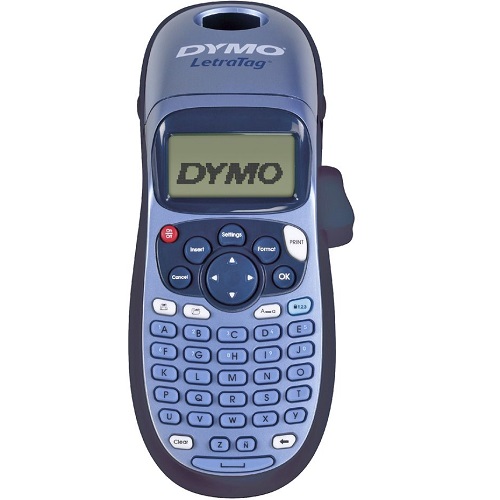
The DYMO LetraTag 100H is a well-regarded handheld label maker. It is simple to operate and offers different font styles, text sizes and basic formatting options. It uses easy-to-load cassettes and is suitable for basic labelling tasks around the home or office.
- Direct transfer labeller
- 5 font sizes and 7 print styles
- 9-label memory and 2-line printing
- Auto-off functionality and LCD screen
- ABC keyboard
- Prints paper, plastic and iron-on labels in 12mm widths
- Uses 4 x AA batteries (not included)
- Labels per minute: 0.5 inches/sec
- 160 dpi resolution
- LCD size: 2.5cm x 5cm
- Warranty: 24 month RTB, extended to 36 months upon registration
Pros
Prints on paper and plastic
Energy efficient
Variety of colours and materials
Cons
Durability of labels
No PC connectivity
Small display size
Best Label Printer for Shipping and Mailing: DYMO LabelWriter 5XL

The DYMO LabelWriter 5XL is specifically designed for shipping labels, supporting 4 x 6 inch labels commonly used by major carriers like Australia Post, eParcel, Sendle and more. It offers fast printing speeds and high-quality, clear labels, making it ideal for eCommerce workflows.
- Direct transfer labeller
- 300 dpi resolution
- No ink required: direct thermal label printer
- Prints 4 x 6 inch shipping labels directly from Amazon, eBay and more
- Dimensions: 7in x 5.5in x 7.38in
- Compatible with DYMO Connect for Desktop on Windows and Mac
Pros
Fast printing speed
High print quality
Compact design
Cons
Higher label costs
Cannot use third-party labels
No automatic cutting
Best Bluetooth/Wireless Label Maker: Brother PT-P710BT
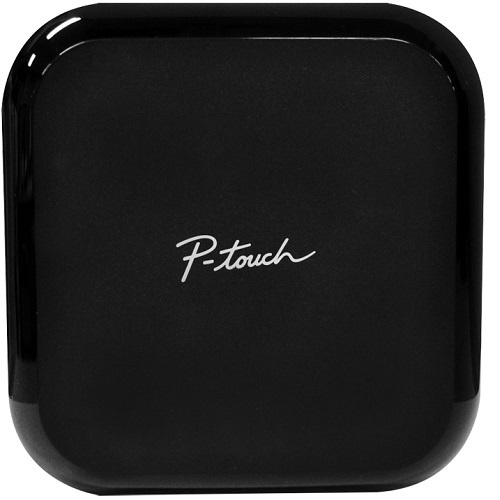
The compact and stylish Brother PT-P710BT, also known as the P-touch Cube Plus, offers wireless Bluetooth and USB connectivity for label printing up to 24mm on durable TZe tapes. Its intuitive apps and software provide diverse design options for home, office and small business labelling.
- Thermal transfer ink labeller
- 180 dpi print resolution
- 20mm/sec print speed
- Full automatic cutter
Pros
Variety of connection options
Has an automatic cutter
Versatile design options
Cons
High price point for handheld
No built-in screen
Dependence on software
What to Look for Before Buying Your Next Label Printer
Should You Go Handheld or Stick with a Desktop?
The choice between a handheld and a desktop label maker really comes down to where and how you will use it.
- Handheld models are ideal for grab-and-go labelling around the home, classroom or office. You type directly on the device and print instantly.
- Desktop models are better for higher volumes, wider labels and more advanced designs. They are usually faster and offer better software support through a computer or mobile app.
Do Not Forget About the Running Costs
When you are shopping around, the price of the actual printer is only half the story. The real ongoing cost comes from the label tapes and rolls. These vary a lot in price depending on the material, width and brand.
Something else to watch out for is compatibility. Some brands try to lock you into their own expensive tapes, while other machines are more flexible and let you use alternative rolls. On the plus side, most label makers use thermal technology, so you do not have to deal with ink or toner replacements.


Any comments?