
HP DeskJet 2510 Ink Cartridges
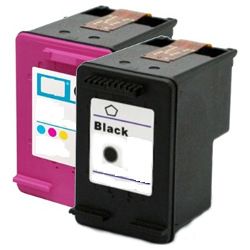
Your HP PSC 2510 Photosmart uses the HP 56 and HP 57 ink cartridge series, a reliable dual-cartridge system engineered to deliver beautiful lab-quality photo prints, vibrant creative graphics, and crisp daily documents. Backed by our 4.8 Google rating, we are dedicated to supplying premium replacements that guarantee precise colour accuracy and smooth tonal transitions. We have been providing replacement alternatives for this specific setup since Oct 2012, helping hobbyists, home offices, and creative professionals maintain a steady, high-quality printing workflow. Because this photo printing setup utilises a combined tri-colour well and dedicated black tank to minimise footprints, users frequently select high-capacity multi-pack bundle options to simplify supply management and optimise long-term print value.


Page yield expectations and vibrant photo lifecycles
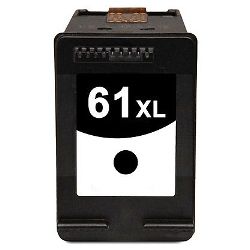
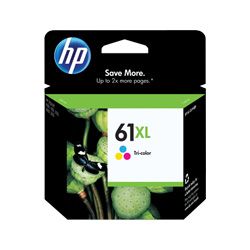
Maintaining a seamless printing workflow requires transparent oversight over inventory stock levels and individual cartridge lifespans. HP establishes expected page yield capacities for the HP 56 standard black and HP 57 tri-colour configurations using standardised manufacturer coverage metrics, which track continuous liquid ink consumption using uniform test pages. Review the detailed product options below to assess print capacities before completing your purchase.
| Cartridge Number | Type | Colour | Page Yield | Cost Per Page |
|---|---|---|---|---|
| 61 | Standard | Black | 190 | $0.25 |
| 61 | Standard | Colour | 165 | $0.35 |
| 61XL | High Yield | Black | 480 | $0.21 |
| 61XL | High Yield | Colour | 330 | $0.33 |
Cost Per Page = Total Cartridge Price ÷ Page Yield (at 5% coverage). Prices based on Genuine cartridges.
Premium compatible ink cartridges
Lowering ongoing home and office printing expenses is straightforward when transitioning to premium replacement options. Utilising premium compatible alternative office supplies provides total physical compatibility without risk. These durable components match original factory specifications in their physical housing structure, specialised dye-based ink formulation, and rich colour density, ensuring your family photo albums, creative portfolios, and administrative records retain an entirely professional presentation. Discover more about managing your office consumable choices by reading our genuine vs compatible cartridges guide.
Best ways to manage your print supply
When your weekly schedule involves heavy photography projects, school assignments, or high-volume document runs, ordering HP 56/57 multi-pack bundle configurations provides the most secure protection against unexpected downtime during an important print job. Every premium replacement ink unit is backed by a full warranty, giving total financial peace of mind to our customers. Free shipping applies to all transactions exceeding $99 (conditions apply). To facilitate rapid logistics nationwide, we dispatch packages directly from regional distribution centres across Sydney, Melbourne, Brisbane, Adelaide, and Perth. Browse our complete range of HP ink cartridges to restock your team.
Pro Tip
The HP PSC 2510 Photosmart features integrated electronic copper contacts on the cartridge bodies rather than on an internal permanent carriage. To maintain pristine print quality and eliminate communication errors, always avoid touching these gold-tinted contact arrays or the micro-nozzle plates with bare fingers during installation, as natural skin oils can disrupt print commands and block fine fluid ports.
Frequently Asked Questions
What are the ink volume and yield benefits of ordering the HP 56 and 57 bundle?
Opting for the multi-pack bundle ensures you receive a matching set of black and tri-colour replacements simultaneously. This prevents unexpected interruptions during mixed text and image printing tasks, whilst offering a lower combined transactional cost compared to procuring the individual tanks separately.
Will using compatible HP 56 and HP 57 units affect my printing setup?
No, our premium compatible alternative cartridges are meticulously reverse-engineered to match the exact dimensions and physical specifications of the factory originals. They slot seamlessly into the internal bays and communicate flawlessly with your printer software without causing structural conflict or voiding statutory consumer coverages.
Why does my printer show an ink alert immediately after installing a new compatible cartridge?
Because the original design belongs to an earlier printing generation, modern system firmware updates might display a benign notification indicating a non-original tank is present. This is a common property of compatible supplies; simply click "OK", "Bypass" or "Continue" on the integrated panel or connected device to proceed with your workflow.


