
Brother HL-1210W Toner Cartridges
Your Brother HL-1210W uses the TN-1070 cartridge series, featuring a split toner and drum architecture to streamline maintenance. Ink Depot has been supplying reliable consumables for this printer since 24 Nov 2014, supporting users who depend on efficient monochrome text printing. Because the toner cartridge locks directly into the separate imaging assembly, text-heavy users replace the carbon powder multiple times before the primary cylinder degrades. Managing this cycle intelligently ensures consistent crispness without premature hardware swap-outs.

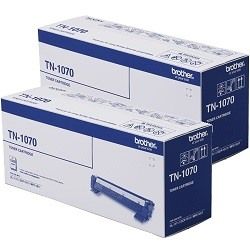

Brother determines the capacity of these mono toner cartridges using the international ISO/IEC 19752 standard for black-only laser printers. This methodology establishes a baseline text coverage of approximately 5% per page. Real-world results fluctuate depending on the font thickness, spacing, and graphic elements present in your documents. When printing dense multi-page forms or complex layouts, the actual lifespan will decrease from the rated output.
| Cartridge Number | Type | Colour | Page Yield | Cost Per Page |
|---|---|---|---|---|
| TN-1070 | Standard | Black | 1,000 | $0.080 |
Cost Per Page = Total Cartridge Price ÷ Page Yield (at 5% coverage). Prices based on Genuine cartridges.
Managing the separate drum and toner lifecycles
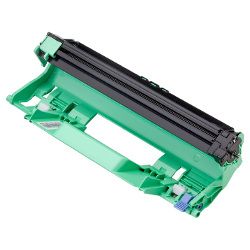
This laser system relies on a two-part consumable configuration comprising the TN-1070 toner and the DR-1070 drum unit. The toner cartridge holds the fine black powder and requires more frequent changes, whereas the drum unit functions as the rotary transfer mechanism and lasts significantly longer. A common mistake is replacing both parts simultaneously, which introduces unnecessary expense. Monitor your print clarity independently of the low toner alerts to gauge true wear.
Experience Tip: After sliding a new DR-1070 drum unit into place, you must manually reset the printer counter by pressing the power button four times to clear the error light and reinitialise tracking.
Choosing the right cartridge setup
Domestic workstations and basic home office environments benefit most from monitoring text volume before purchasing. If your workflow involves steady documentation, opting for multi-packs provides a safer buffer against unexpected depletion during critical print runs. Reviewing our comprehensive Returns policy gives you peace of mind regarding standard manufacturer warranties on original products. Free delivery applies on all orders over $99 (conditions apply), and orders ship rapidly from our dedicated regional warehouses located in Perth, Brisbane, Sydney, Melbourne and Adelaide. For other models or systems, visit our main Brother toner cartridges portal to view the entire catalogue.
Pro Tip
Do not confuse a faded print alert with a worn-out drum unit; a faint vertical line or repeating black spot down the margin indicates a scratched drum cylinder, whereas a gradual fading across the entire page means the toner powder itself is exhausted.
Frequently Asked Questions
Why does my printer still say replace toner after I just installed a new TN-1070 cartridge?
This issue usually stems from the mechanical reset gear on the side of the cartridge failing to engage with the internal sensor during insertion. Simply remove the toner assembly, ensure it is seated firmly back inside the DR-1070 drum frame, and slide the complete unit slowly into the printer until it clicks into place.
Can I run the DR-1070 drum unit past its official 10,000-page rating?
Yes, the printer will trigger a warning light based on rotational count rather than actual physical damage. You can reset the counter and continue printing safely until you notice physical print defects like grey background tracking, recurring dots, or blurred text.
How do I clean the corona wire on the Brother HL-1210W?
If you experience vertical black lines down your pages, locate the green slider tab on the DR-1070 drum unit. Gently slide this tab back and forth across the assembly several times to remove paper dust and loose toner from the corona wire, ensuring you return the tab to its starting position before reinstalling.


