
Epson 73N Ink Cartridges
Epson 73N ink cartridges power a wide selection of Stylus printers, and choosing the right replacement setup helps manage ongoing running expenses. This four-colour discrete cartridge series is available in budget-friendly compatible options, meaning you only need to swap out the specific individual colour that runs empty. Our 4.8 Google Star rating shows that our customers consistently receive high-quality cartridges backed by reliable performance.





Choosing the right cartridge setup
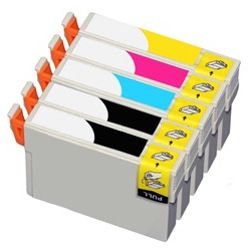
Text-heavy documents deplete the black ink far quicker than the individual cyan, magenta, and yellow options. To minimise tracking individual reorder cycles, opting for a 5-pack bundle provides an extra black ink supply to balance out this natural multi-colour depletion pattern. Every compatible version we supply includes a complete money-back guarantee to ensure hassle-free operation.
We dispatch all items directly from our local fulfilment hubs in Melbourne, Sydney, Brisbane, Adelaide, and Perth to maintain rapid delivery times across Australia. Free delivery applies on all orders over $99. To source replacements for other printer models, explore our main Epson ink cartridges catalogue, or review our formal Returns policy for complete warranty coverage details.
What to know about compatible cartridges
Selecting premium third-party replacements offers a direct path to lowering domestic printing bills without sacrificing text sharpness or line clarity. Under Australian Consumer Law, using compatible cartridges does not void your printer warranty. These individual cartridges fit the exact internal slots of your Stylus printer, safely operating alongside original chips to track ink depletion levels accurately. For an in-depth breakdown of how third-party options perform compared to originals, read our detailed guide on the genuine vs compatible cartridges blog post.
Expected page output and replacement cycles
Page performance is measured under strict ISO/IEC 24711 international testing standards using continuous print templates. Standard T1051 black cartridges yield approximately 230 pages, while the T1052, T1053, and T1054 colour components deliver roughly 310 pages each. Real-world results vary based on graphic coverage density, printhead cleaning cycles, and document complexity.
| Cartridge Number | Type | Colour | Page Yield | Cost Per Page |
|---|---|---|---|---|
| 73N | Standard | Black | 230 | $0.030 |
| 73N | Standard | Cyan | 310 | $0.022 |
| 73N | Standard | Magenta | 310 | $0.022 |
| 73N | Standard | Yellow | 310 | $0.022 |
Cost Per Page = Total Cartridge Price ÷ Page Yield (at 5% coverage). Prices based on Compatible cartridges.
Pro Tip
Epson micro-piezo printheads are built directly into the printer rather than the cartridge itself. If you leave your printer idle for several weeks, residual ink inside the micro-nozzles can dry out, causing faint lines or banding. To prevent this issue and avoid wasting valuable ink on forced printhead deep-cleaning cycles, print at least one full-colour page every fortnight to keep the liquid ink channels completely clear.
Frequently Asked Questions
Why does my printer indicate an empty cartridge when it still feels like it contains liquid ink?
The microchip on the T1051 to T1054 series calculates safety thresholds to protect the permanent printhead. Operating the printer with an entirely dry cartridge causes destructive thermal damage to the micro-piezo nozzles, so the chip triggers a replacement prompt slightly before the physical reservoir is completely empty.
Can I mix a single compatible 73N cartridge into a printer currently running original Epson inks?
Yes, these compatible cartridges are fully cross-compatible and can be mixed and matched alongside original supplies. The internal chip communicating with your Stylus printer tracks ink levels seamlessly regardless of whether the neighbouring cartridge slots contain original or compatible inks.
Why does the 73N colour cartridge show a higher page yield than the black cartridge?
The ISO test suite for colour printing distributes ink across three separate cartridges (cyan, magenta, and yellow), meaning less volume is drawn from each individual colour tank per page. The black cartridge handles all text-based components entirely on its own, which depletes its standard 230-page volume faster despite its larger physical demand.


