
Canon PIXMA Pro-10 Ink Cartridges
Shop ink cartridges for your Canon PIXMA Pro-10, which uses the Canon PGI-72 ink cartridges series. Ink Depot has been supplying reliable consumables for this printer since Apr 2013. Designed for A3+ archival photo printing, this 10-colour LUCIA pigment system consumes 72CO Chroma Optimizer heavily on glossy paper, while fine art media draws more PGI-72MB Matte Black. Our 4.8 Google rating reflects a long-standing track record of premium cartridge performance.
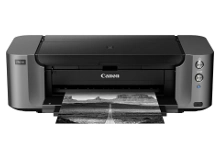


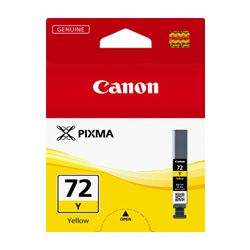
Expected Page Yields for Fine Art and Photo Printing
Page yields for the PGI-72 series are measured using ISO/IEC 29102 photo test standards. Actual consumption varies significantly based on print size, colour balance, and paper finish, as high-gloss prints require more 72CO Chroma Optimizer than matte output.
| Cartridge Number | Type | Colour | Page Yield | Cost Per Page |
|---|---|---|---|---|
| PGI-72MB | Standard | Black | 202 | $0.10 |
| PGI-72PB | Standard | Photo Black | 44 | $0.47 |
| PGI-72C | Standard | Cyan | 73 | $0.28 |
| PGI-72PC | Standard | Cyan | 89 | $0.23 |
| PGI-72M | Standard | Magenta | 73 | $0.28 |
| PGI-72PM | Standard | Magenta | 69 | $0.30 |
| PGI-72Y | Standard | Yellow | 85 | $0.24 |
| PGI-72GY | Standard | Yellow | 144 | $0.14 |
| PGI-72CO | Standard | Chroma optimizer | 31 | $0.67 |
| PGI-72R | Standard | Red | 144 | $0.15 |
Cost Per Page = Total Cartridge Price ÷ Page Yield (at 5% coverage). Prices based on Genuine cartridges.
Selecting the Right PGI-72 Cartridge Sets
If you print high volumes of exhibition photos, full 10-cartridge multipacks provide the best value across the entire colour spectrum. Fine art printing consumes grey and photo black faster during monochrome reproduction, while colour graphics draw on 72PC Photo Cyan and 72PM Photo Magenta. To protect your purchase, review our returns policy. We dispatch directly from Perth, Brisbane, Sydney, Melbourne and Adelaide warehouses. Free delivery applies on all orders over $99 when stocking up on genuine Canon ink cartridges.
Pro Tip for LUCIA Pigment Cartridges
Always keep a spare 72CO Chroma Optimizer cartridge on hand when producing glossy prints. Clear coat ink depletes independently of colour channels, and running out will pause glossy print jobs even if your colour cartridges are full.
Frequently Asked Questions
Why does the PGI-72CO Chroma Optimizer run out faster than colour cartridges?
Chroma Optimizer is applied as a clear top coat over pigment inks to smooth out surface gloss variations and prevent bronzing. High-gloss media uses it across the entire printed surface, so full-bleed photo printing depletes it quicker than individual colour inks.
Can I leave both Matte Black and Photo Black cartridges installed at the same time?
Yes, the printer houses both PGI-72MB Matte Black and PGI-72PB Photo Black simultaneously. The print driver automatically selects which black ink to fire based on the paper type setting you choose, eliminating the need for manual swapping.
Why are there dedicated Photo Cyan and Photo Magenta cartridges alongside standard Cyan and Magenta?
Photo Cyan (72PC) and Photo Magenta (72PM) use lower pigment concentrations designed to produce subtle tonal gradations and natural skin tones in light highlight areas, preventing visible dot graininess in fine art photography.


