
Best Home Printers In Australia

Buying a printer in Australia is not what it used to be. With the massive growth of NBN-powered home offices and the jump in supply costs, a cheap retail model often costs you the most over time. We analyzed the latest from Brother, HP, Epson and more to pick the true 2026 winners.
2026 Printer Buying Map
Match the printer to the jobDocuments First
Laser printers suit fast, sharp text and low-maintenance everyday paperwork.
Photo Quality
Six-colour photo systems are built for rich colour, smoother gradients and creative work.
Lowest Running Cost
Ink-tank printers reduce refill frequency and usually win on long-term household value.
Our Strategy for the 2026 Lineup
We did not choose these models just by looking at the price tags. Our team used a data-heavy process to make sure these picks actually work for your wallet.
- The Yield-to-Cost Audit: We checked the Cost Per Page (CPP) by comparing manufacturer claims against ISO/IEC 24711 standards. This reveals which machines stay cheap over the years. Source: ISO/IEC 24711 Standards.
- Network Resilience: Most Aussie homes run on mesh Wi-Fi now. We picked printers with WPA3 security and Dual-band Wi-Fi to stop those annoying offline errors.
- Real Workflow: We looked for Single-pass Duplex Scanning. This scans both sides of a page at once, a must-have for anyone handling multi-page contracts.
Evaluation Framework
How the winners were filteredYield-to-Cost
Cost per page and refill yield were weighted above the sticker price.
Network Reliability
Wireless stability matters in modern Australian home offices.
Workflow Fit
Duplex scanning, paper capacity and practical speed separate good from great.
- Best Overall: Brother MFC-J6959DW
- Best for Photo: Epson EcoTank ET-8550
- Best for Speed: Brother HL-L5210DW
- Best Budget: Epson EcoTank ET-2910/ET-2911
- Best Home Office: HP Color LaserJet Pro MFP 3301
- Best True Ink-Tank: Epson EcoTank ET-4950
- 2026 Top Picks at a Glance
- Buying Mistakes to Avoid
- Printers to Avoid
- FAQ
- 7 Tips to Save Real Money
Best Printers by Category
All recommended printers in this guideBrother MFC-J6959DW
Best all-rounder for A3 printing, roll-paper banners and serious home-office workflows.
Epson EcoTank ET-8550
Best for photo printing, creative work and premium colour output. Currently low stock; see note below.
Brother HL-L5210DW
Best for fast black-and-white documents, invoices, reports and contracts.
Epson EcoTank ET-2910/ET-2911
Best budget-friendly option with low long-term refill costs.
HP Color LaserJet Pro MFP 3301
Best for crisp business documents, scanning and professional home-office use.
Epson EcoTank ET-4950
Best everyday ink-tank printer for families, home offices and regular printing.
2026 Top Picks at a Glance
| Category | Winner | Key Strength |
|---|---|---|
| Best Overall | Brother MFC-J6959DW | A3 roll-paper banner printing, duplex scan and 750-sheet capacity |
| Best for Photo | Epson EcoTank ET-8550 | 6-colour system for gallery-grade prints |
| Best Budget | Epson EcoTank ET-2910/ET-2911 | Low-cost entry point with high-yield bottles |
| Best Home Office | HP Color LaserJet MFP 3301 | Professional text clarity for work documents |
| Best True Ink-Tank | Epson EcoTank ET-4950 | Duplexing ADF, 250-sheet tray, 18ppm engine |
| Best for Speed | Brother HL-L5210DW | 48ppm engine for high-output workflows |
The Real Cost of Printing
Ongoing cost matters more than shelf priceBest Overall Home Printer: Brother MFC-J6959DW A3 Business Inkjet Wireless Printer (Duplex)
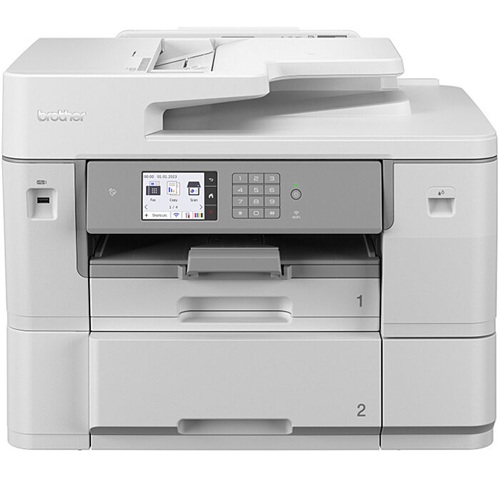
Brother's flagship A3 business inkjet, the MFC-J6959DW replaces the outgoing MFC-J6957DW with a genuine standout feature: built-in roll-paper printing, letting you print and auto-cut banners up to 2.7m for signage or posters without outsourcing. It handles full A3/A4 duplex printing and scanning, hits a 4.4-second first page out time, and combines 750 sheets across two trays for high-volume mixed media handling. Keep in mind it is a big machine that needs a desk at least 60cm deep.
Pros
All-in-one (print, scan, copy, fax)
A3 and A4 duplex printing AND duplex scanning
Roll-paper banner printing up to 2.7m with auto-cutter
750-sheet paper capacity across two trays
Fast 30ppm print speed, 4.4-second first page out
Ethernet, dual-band Wi-Fi, NFC and AirPrint
Cons
Large footprint, needs 60cm+ desk depth
Setup cartridges are standard-yield, so budget for LC436XL high-yield on day one
Premium price point for a home setting
Best Photo Home Printer: Epson EcoTank ET-8550 Multifunction A3+ Inkjet Printer

The Epson EcoTank ET-8550 is perfect for families who print lots of photos. The 6-colour Claria system produces quality that matches a professional result, and the ink in the box can last up to two years. If your printed photos are headed for scrapbooking or craft projects, a set of Posca pens is a handy way to add captions and finishing touches by hand.
Pros
6-colour Claria ink, gallery-grade photo output
Prints up to A3+ borderless
Ink in the box lasts up to 2 years average use
Refillable tanks, replace only the colour you use
Cons
High upfront cost compared to budget inkjets
Scanner maxes at A4 (no A3 scan)
Slower print speeds than office models
Large physical footprint
Best for Speed and Volume: Brother HL-L5210DW Mono Laser Printer

If you print huge stacks of black-and-white pages, this is your best bet. The Brother HL-L5210DW prints 48 pages per minute, the fastest mono laser in this roundup. Note that this is a monochrome printer only and does not scan or copy.
Pros
Blazing 48ppm print speed
Dual-band Wi-Fi and Gigabit Ethernet
Super-high-yield toner: 11,000 pages
Automatic duplex printing standard
Cons
Monochrome only, no colour printing
No scan or copy function
Overkill for light home use
Best Budget Home Printer: Epson EcoTank ET-2910 / ET-2911 Wireless Inkjet Printer

The ET-2820 has been retired for 2026 in favour of the ET-2910 (white) and ET-2911 (black), which remain the best way to quit the cartridge trap on a budget. It ships with enough ink for roughly 3,600 black or 6,500 colour pages straight out of the box, and the heat-free technology keeps prints sharp even if the machine sits idle for weeks. It does not have an automatic document feeder, so you scan one sheet at a time.
Pros
Refillable ink tanks, no cartridge costs
Wi-Fi, Wi-Fi Direct and AirPrint built in
Print, scan, and copy all-in-one
Compact, fits easily on a small desk
Cons
No automatic document feeder (ADF)
11ppm black / 6ppm colour, not suited to heavy use
No fax function
Best for Home Office: HP Color LaserJet Pro MFP 3301 Multifunction Printer
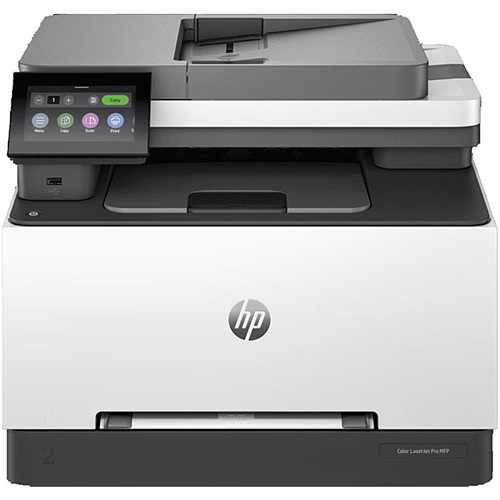
For work documents that need to stay sharp, this is the laser to reach for. The HP Color LaserJet Pro MFP 3301's toner won't smudge under a highlighter, and its scanner is fast enough that the ADF chews through thick contracts without slowing you down.
Pros
Smudge-proof laser output, highlighter safe
Fast ADF for multi-page contract scanning
25ppm colour and mono
No inkjet clogging, reliable after idle time
Cons
OEM toner is expensive, use compatible
Higher upfront cost than inkjet alternatives
Not suited for photo printing
Best True Ink-Tank Printer: Epson EcoTank ET-4950 All-in-One Printer
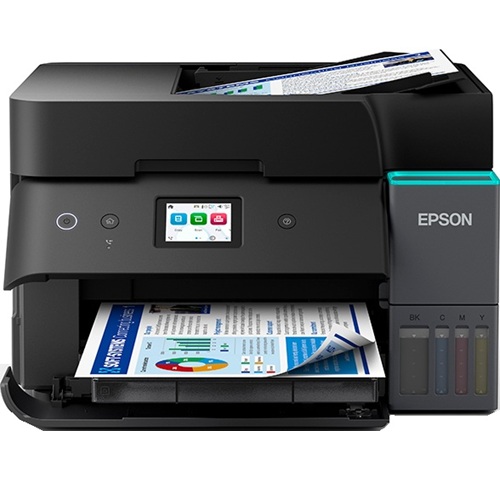
The Epson EcoTank ET-4950 builds on the older ET-4850 with one meaningful upgrade: a duplexing 30-page ADF that scans and copies both sides of a page automatically, something the ET-4850 couldn't do. As Epson's 7th-generation EcoTank, it's built for households that treat their printer like a real home office.
Pros
Genuine refillable ink tank (not cartridges)
250-sheet tray + duplexing 30-page ADF
Up to 6,600 black / 5,500 colour pages in box
Print, scan, copy, fax with 18ppm black speed and a 2.4" touchscreen
Cons
Higher upfront cost than budget inkjets
Larger footprint than compact models
No A3 printing (A4 maximum)
Which Printer Is Right For You?
Simple decision pathHigh-Cost Buying Risks
Avoid these before checkoutCritical Buying Mistakes to Avoid
Printers to Avoid in 2026
Frequently Asked Questions
Expert Tips to Save Real Money
- The Font Strategy: Switching to a lighter font like Century or Calibri instead of a bold, ink-heavy font like Arial can meaningfully cut ink usage on text-heavy documents. Research published in MDPI Sustainability found eco-fonts can reduce ink consumption by up to 28% depending on the font pair and coverage tested. It's a free way to stretch your cartridge further on everyday printing.


Any comments?