
Brother HL-L3240CDW Toner Cartridges
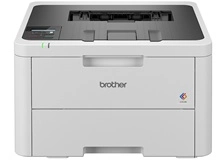
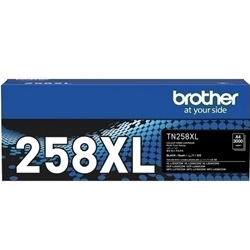
Shop toner cartridges for the Brother HL-L3240CDW, which uses the Brother TN258 and Brother TN258XL toner series. Designed for small offices and everyday colour printing, this compact LED printer uses separate black, cyan, magenta and yellow cartridges for reports, correspondence and marketing documents. High-yield Brother TN258XL cartridges can reduce replacement frequency during larger print runs, while keeping a spare black cartridge available can help minimise unexpected interruptions. Ink Depot has supplied consumables for this printer model since Jan 2024 and is rated 4.8 by customers on Google.






Selecting the Right Cartridge Setup for Office Workflows
Brother TN258 cartridges are suitable for lighter or occasional office printing, while high-yield Brother TN258XL cartridges reduce replacement frequency during busier workloads. Offices producing mainly invoices, reports, correspondence and shipping documents may benefit from keeping an additional Brother TN258XL black cartridge available. Businesses printing regular presentations, charts or marketing materials may prefer a complete colour set or multi-pack.
Compatible cartridges are covered by a money-back performance guarantee. Browse our complete range of Brother toner cartridges for supplies used by other Brother printer models.
Managing the Drum, Belt and Waste Toner Components
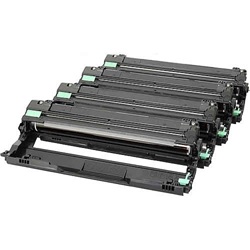
The Brother HL-L3240CDW uses separate toner and maintenance components. The DR258CL drum unit, BU229CL belt unit and WT229CL waste toner box operate independently from the toner cartridges and are replaced only when required. Replacing a Brother TN258 or Brother TN258XL toner cartridge does not replace or renew these maintenance components.
Experience Tip: When replacing the DR258CL drum unit, follow the Brother installation instructions and reset the drum counter only after the new drum has been installed. Brother rates the drum at up to 20,000 pages based on one page per print job, while actual life varies with usage.
Expected Page Output and Replacement Cycles
Standard-yield Brother TN258 black, cyan, magenta and yellow cartridges each print up to 1,000 pages. High-yield Brother TN258XL black cartridges print up to 3,000 pages, while Brother TN258XL cyan, magenta and yellow cartridges each print up to 2,300 pages. These yields are measured in accordance with ISO/IEC 19798, although actual output varies depending on page coverage, print settings and document complexity.
| Cartridge Number | Type | Colour | Page Yield | Cost Per Page |
|---|---|---|---|---|
| TN258BK | Standard | Black | 1,000 | $0.14 |
| TN258C | Standard | Cyan | 1,000 | $0.16 |
| TN258M | Standard | Magenta | 1,000 | $0.16 |
| TN258Y | Standard | Yellow | 1,000 | $0.16 |
| TN258XLBK | High Yield | Black | 3,000 | $0.061 |
| TN258XLC | High Yield | Cyan | 2,300 | $0.084 |
| TN258XLM | High Yield | Magenta | 2,300 | $0.084 |
| TN258XLY | High Yield | Yellow | 2,300 | $0.084 |
Cost Per Page = Total Cartridge Price ÷ Page Yield (at 5% coverage). Prices based on Genuine cartridges.
Choosing Between Genuine and Compatible Cartridges
Genuine Brother toner cartridges are manufactured specifically for supported Brother printers, while premium compatible cartridges provide a more affordable option for everyday office printing. Using compatible cartridges does not automatically remove your rights under Australian Consumer Law. Ink Depot compatible cartridges are covered by a money-back performance guarantee if they do not install, register or perform as expected. Read our genuine vs compatible cartridges guide to compare the available options.
If you order the wrong product, review the available options through our returns policy. Free delivery applies on orders over $99, with products dispatched from distribution centres in Perth, Brisbane, Sydney, Melbourne and Adelaide.
Pro Tip
You can use supported Brother TN258 and Brother TN258XL cartridge yields together in the same printer. For example, a high-yield Brother TN258XL black cartridge can be installed while standard-yield Brother TN258 cyan, magenta and yellow cartridges remain in use. Replace each cartridge when the printer identifies that specific colour as requiring attention.
Frequently Asked Questions
Can I use a Brother TN258XL black cartridge with Brother TN258 colour cartridges?
Yes. The Brother HL-L3240CDW supports both Brother TN258 and Brother TN258XL toner cartridges, and different supported yields can be installed at the same time. You can therefore use a high-yield Brother TN258XL black cartridge while standard-yield Brother TN258 colour cartridges remain installed.
Why does my printer display Replace Drum after I install a new toner cartridge?
The Brother TN258 toner cartridges and DR258CL drum unit are separate consumables with independent replacement cycles. Toner cartridges supply the toner powder, while the drum unit forms and transfers the image during printing. Installing a new toner cartridge does not replace or reset the drum unit.
What should I do if a new toner cartridge is not recognised?
Confirm that the cartridge is a supported Brother TN258 or Brother TN258XL model, that it is installed in the correct colour position and that all protective packaging has been removed. Remove and reinstall the cartridge according to the Brother instructions. If the message remains, contact Ink Depot for assistance rather than touching the cartridge contacts or internal printer components.


