
Brother MFC-L2710DW MFC-L2713DW MFC-L2730DW MFC-L2750DW Toner Cartridges
Your Brother MFC-L2710DW, MFC-L2713DW, MFC-L2730DW, and MFC-L2750DW printers use the Brother TN-2430 and TN-2450 toner cartridge series along with DR-2425 drum units. Ink Depot has been supplying reliable consumables for these monochrome laser printers since Nov 2017. Our 4.8 Google rating reflects a long-standing track record of premium cartridge performance. Upgrading from standard TN-2430 toners to high-yield TN-2450 options drastically cuts printing costs during high-volume document runs.

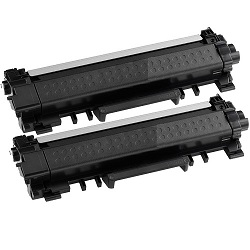


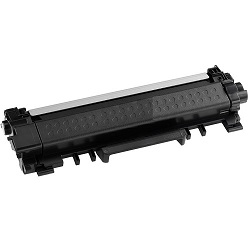


Expected Page Output and Replacement Cycles
Standard TN-2430 toners yield up to 1,200 pages, whereas high-yield TN-2450 toners deliver approximately 3,000 pages based on ISO/IEC 19752 testing standards. High-volume document workflows benefit significantly from the higher capacity, reducing cartridge swap frequency.
| Cartridge Number | Type | Colour | Page Yield | Cost Per Page |
|---|---|---|---|---|
| TN-2430 | Standard | Black | 1,200 | $0.080 |
| TN-2450 | High Yield | Black | 3,000 | $0.056 |
Cost Per Page = Total Cartridge Price ÷ Page Yield (at 5% coverage). Prices based on Genuine cartridges.
Choosing Between Genuine and Compatible Toners
Selecting compatible cartridges is a practical way to lower office printing expenses without compromising text sharpness. Under Australian Consumer Law, using compatible cartridges does not void your printer warranty. Read our guide on genuine vs compatible cartridges to decide which option best matches your workspace demands.
DR-2425 Drum Unit Lifecycles
In this Brother printing system, the drum unit operates independently from the toner cartridge. The DR-2425 drum unit has an expected lifespan of 12,000 pages, meaning it lasts through roughly four high-yield TN-2450 toner replacements before requiring renewal.
Managing Office Stock and Delivery
If you print mainly text documents, selecting high-yield TN-2450 cartridges or bulk multi-packs ensures the lowest ongoing printing costs. Compatible options are backed by a money-back guarantee if they do not perform as expected. For further details on guarantees, review our returns policy. Free delivery applies on all orders over $99. Orders ship directly from our warehouses in Perth, Brisbane, Sydney, Melbourne, and Adelaide for fast arrival. Explore our complete range of Brother toner cartridges to suit your workspace.
Pro Tip for Brother Toner Users
Knowing that the DR-2425 drum unit is separate from the TN-2430 and TN-2450 toner cartridges ensures you only replace the drum when its 12,000-page counter prompts, rather than discarding it during routine toner changes.
Frequently Asked Questions
Do the Brother MFC-L2710DW, MFC-L2713DW, MFC-L2730DW, and MFC-L2750DW use the same toner cartridges?
Yes, all four models in this monochrome laser series share identical TN-2430 and TN-2450 toner cartridges and the DR-2425 drum unit.
Can I install a high-yield TN-2450 toner if my printer originally came with a standard TN-2430?
Yes, both TN-2430 and TN-2450 cartridges share identical physical outer dimensions and slot directly into the same DR-2425 drum unit housing. The TN-2450 simply contains more toner powder.
Is the DR-2425 drum unit replaced at the same time as the TN-2450 toner cartridge?
No, the drum unit and toner cartridge are separate components. While a TN-2450 toner yields up to 3,000 pages, the DR-2425 drum unit lasts for approximately 12,000 pages, meaning one drum typically outlasts four high-yield toner cartridges.
How do I know when to order a new DR-2425 drum unit versus a TN-2450 toner?
Your printer displays distinct alert messages for each consumable. A 'Toner Low' message indicates the TN-2430 or TN-2450 powder is depleted, whereas a 'Replace Drum' notification signals that the DR-2425 drum surface has completed its 12,000-page duty cycle.


