
Canon PG-50 & CL-51 Ink Cartridges
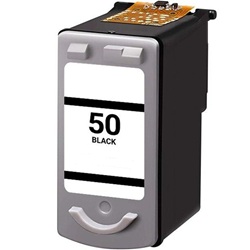
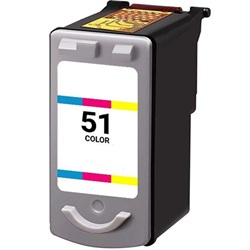
Canon PG-50 black and CL-51 colour ink cartridges feature integrated fine printhead technology, delivering crisp document text and vibrant photo prints across compatible PIXMA and Fax printers. Both genuine and third-party options offer high-capacity output for extended duty cycles. Our 4.8 Google Star rating shows that our customers consistently receive high-quality cartridges backed by reliable performance.
Printers Compatible with Canon PG-50 & CL-51 Ink Cartridges



Expected Page Output and ISO Yield Standards
The PG-50 black delivers up to 510 pages using pigment-based ink, while the CL-51 tri-colour cartridge yields up to 545 pages. Yields are declared in accordance with ISO/IEC 24711 testing standards for continuous inkjet printing.
Choosing Between Genuine and Compatible Options
Third-party PG-50 and CL-51 alternatives reduce your printing expenses while maintaining printhead physical geometry. Under Australian Consumer Law, using compatible cartridges does not void your printer warranty. Read our comprehensive genuine vs compatible cartridge guide to evaluate performance criteria.
How Most Users Manage Replacements
If you print mostly text documents, the PG-50 pigment ink provides superior smudge resistance on plain paper. If one colour depletes inside the CL-51 tri-colour unit, the entire cartridge must be replaced to restore full colour balance. Compatible options include a 90-day money-back guarantee via our returns policy. Free delivery applies on all orders over $99, with fast dispatch from our national warehouses in Perth, Brisbane, Sydney, Melbourne, and Adelaide. Browse our full range of Canon ink cartridges.
Pro Tip
Because the PG-50 and CL-51 cartridges feature built-in printheads, replacing the cartridge installs a brand-new thermal firing mechanism, resolving nozzle clogs or print banding immediately.
Frequently Asked Questions
Can I use PG-50 and CL-51 cartridges alongside standard PG-40 and CL-41 cartridges?
Yes. PG-50 and CL-51 are high-yield versions of the PG-40 and CL-41 cartridges. They share identical physical dimensions and printhead contacts, meaning you can install a PG-50 alongside a standard CL-41 without compatibility issues.
Why does the CL-51 cartridge run out of ink when I only print photos in one tone?
The CL-51 tri-colour cartridge integrates cyan, magenta, and yellow ink into a single physical unit. Even when printing single-tone photo gradients or greyscale images, the printer blends all three colours to balance tone depth, depleting the primary shade faster.
Will my printer recognise a compatible PG-50 or CL-51 cartridge immediately?
Yes, though older Canon printers may occasionally display a low ink warning for compatible cartridges with integrated printheads. Overriding the warning by holding the Stop/Reset button for 5 seconds clears the prompt and enables continuous printing.


