
Brother TN2330 & Brother TN2350 Toner Cartridges
Shop Brother TN2330 and Brother TN2350 toner cartridges for compatible Brother monochrome laser printers. The standard-yield TN2330 suits lighter everyday document printing, while the high-yield TN2350 helps reduce cartridge changes in busy offices and shared workspaces. Choose from genuine Brother toner and cost-effective compatible options for clear black text, reports and routine business documents. Our 4.8 Google rating reflects our long-standing record of reliable cartridge quality and customer service.
Printers Compatible with Brother TN2330 & Brother TN2350 Toner Cartridges


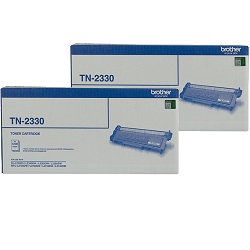
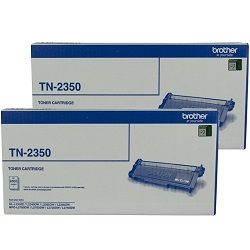


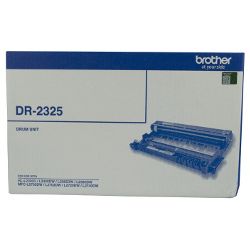
Brother TN2330 and TN2350 toner cartridge yields
Brother TN2330 and Brother TN2350 toner cartridges provide different page capacities for compatible Brother monochrome laser printers. The standard-yield TN2330 produces up to 1,200 pages, while the high-yield TN2350 produces up to 2,600 pages. These yields are measured under ISO/IEC 19752 testing conditions, with actual output varying according to page coverage, print settings and document type.
| Cartridge Number | Type | Colour | Page Yield | Cost Per Page |
|---|---|---|---|---|
| TN-2330 | Standard | Black | 1,200 | $0.082 |
| TN-2350 | High Yield | Black | 2,600 | $0.064 |
Cost Per Page = Total Cartridge Price ÷ Page Yield (at 5% coverage). Prices based on Genuine cartridges.
Choosing between Brother TN2330 and TN2350 toner
The Brother TN2330 is suitable for home offices and workplaces with lighter printing requirements. The higher-capacity Brother TN2350 is a better choice for regular business printing because it requires fewer cartridge changes and generally delivers a lower cost per page.
Offices printing invoices, reports, correspondence and other multi-page documents may benefit from choosing TN2350 cartridges or multipacks. Keeping a spare toner cartridge available can also help prevent interruptions when the current cartridge reaches the end of its usable life.
Genuine and compatible toner options
Both genuine and compatible Brother TN2330 and TN2350 toner cartridges are available. Genuine cartridges are manufactured by Brother, while compatible cartridges provide a cost-effective alternative for everyday black-and-white document printing.
Under Australian Consumer Law, using a compatible cartridge does not automatically void your printer warranty. Compatible toner purchases are also covered by our money-back guarantee. Read our genuine vs compatible cartridges guide to compare your options.
Replacing toner and the DR2325 drum unit
Brother TN2330 and TN2350 toner cartridges work with a separate DR2325 drum unit. When the printer displays a toner warning, you normally need to replace only the toner cartridge rather than the complete drum assembly.
The DR2325 drum has a longer replacement cycle and is rated for up to approximately 12,000 pages under normal operating conditions. Replace the drum only when the printer displays a drum warning or when print quality indicates that the drum surface may be worn.
Ordering Brother TN2330 and TN2350 toner cartridges
Choose an individual TN2330 or TN2350 toner cartridge when replacing a single unit, or select a multipack to keep additional toner available for a busy office. The standard-yield option suits occasional printing, while the high-yield TN2350 helps reduce replacement frequency during heavier workloads.
Free delivery applies on orders over $99, with fast dispatch available across Australia from warehouses in Sydney, Melbourne, Brisbane, Adelaide and Perth. Incorrectly ordered items can be returned in accordance with our returns policy. Browse our full range of Brother toner cartridges for other Brother printer models and toner series.
Pro Tip
When replacing a TN2330 or TN2350 cartridge, remove the toner and drum assembly from the printer and release only the toner cartridge from the DR2325 drum frame. Keep the existing drum unit unless the printer displays a drum replacement warning. After installing the new toner, gently slide the green corona wire cleaning tab from side to side and return it to its original position before reinstalling the assembly.
Frequently Asked Questions
What is the difference between Brother TN2330 and TN2350 toner cartridges?
The Brother TN2330 is a standard-yield black toner cartridge rated for up to 1,200 pages. The Brother TN2350 is a high-yield cartridge rated for up to 2,600 pages, making it better suited to regular or higher-volume document printing.
Can I replace a TN2330 cartridge with a TN2350?
Yes. Compatible Brother printers that use the TN2330 can generally also accept the higher-yield TN2350. Both cartridges fit into the same DR2325 drum system, allowing you to upgrade without changing the drum unit.
Do I need to replace the DR2325 drum when changing toner?
No. The DR2325 drum is a separate consumable and normally lasts through several toner cartridge replacements. Replace it only when the printer displays a drum warning or print quality begins to decline.
Why does my printer still show a toner warning after installation?
Remove the toner and drum assembly, confirm that the new cartridge is seated firmly inside the DR2325 drum unit and reinstall it carefully. If the warning remains, follow the toner reset or troubleshooting instructions for your specific Brother printer model.


