
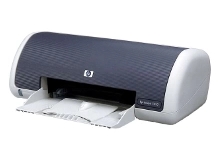
HP Deskjet 3420 3425 Ink Cartridges
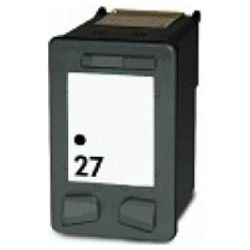
Shop ink cartridges for your HP Deskjet 3420 and 3425, which use the HP 27 and 28 ink cartridges series. As demonstrated by our 4.8 Google rating, we are committed to providing premium consumable cartridges. Ink Depot has been supplying reliable consumables for these desktop home printers since Jan 2002. Text-heavy document printing naturally depletes the 27 (C8727AA) black cartridge much faster than the 28 (C8728AA) tri-colour unit.

Expected page yields and replacement frequency
Expected page yields are calculated based on ISO/IEC standards using 5% page coverage. Because the 28 (C8728AA) tri-colour cartridge shares cyan, magenta, and yellow ink in a single tank, heavy use of a single shade depletes the whole cartridge sooner than simple text printing consumes the 27 (C8727AA) black cartridge.
| Cartridge Number | Type | Colour | Page Yield | Cost Per Page |
|---|---|---|---|---|
| 27 | Standard | Black | 220 | $0.091 |
| 28 | Standard | Colour | 190 | $0.100 |
Cost Per Page = Total Cartridge Price ÷ Page Yield (at 5% coverage). Prices based on Compatible cartridges.
Choosing compatible HP 27 and 28 ink cartridges
Choosing compatible cartridges is a practical choice for everyday home printing. Under Australian Consumer Law, using compatible cartridges does not void your printer warranty. Read our comprehensive genuine vs compatible cartridges comparison guide to see how compatible cartridges offer high reliability for home document output.
Stocking up and fast delivery options
For standard home printing, keeping a spare 27 (C8727AA) black cartridge on hand avoids sudden stops during print jobs. Compatible cartridges from Ink Depot are backed by our 90-day money-back guarantee, outlined in our returns policy. Free delivery applies on all orders over $99, dispatched quickly from our warehouses in Perth, Brisbane, Sydney, Melbourne, and Adelaide. Browse our complete range of HP ink cartridges for all your home office supplies.
Consumable Pro Tip
Because the HP 28 (C8728AA) tri-colour cartridge uses a single combined chamber for cyan, magenta, and yellow inks, printing document graphics with dark composite fills consumes colour reserves rapidly. To preserve colour ink for photo or graphic prints, set your printer driver defaults to "Print in Greyscale" or "Black Ink Only" when outputting everyday web pages or text drafts.
Frequently Asked Questions
Do the HP Deskjet 3420 and Deskjet 3425 use the same ink cartridges?
Yes, both the Deskjet 3420 and 3425 share the identical HP 27 (C8727AA) black and HP 28 (C8728AA) tri-colour cartridge system, making them fully interchangeable across both printer models.
What happens when one colour runs out in the HP 28 tri-colour cartridge?
When any single colour channel (cyan, magenta, or yellow) depletes inside the 28 (C8728AA) cartridge, the entire unit must be replaced to restore full-colour printing, even if ink remains in the other two reservoirs.
Can I print using only the HP 27 black cartridge if the HP 28 colour cartridge is empty?
Yes, the Deskjet 3420 and 3425 support single-cartridge printing mode. You can remove the depleted 28 (C8728AA) colour cartridge and continue outputting black text documents using only the 27 (C8727AA) black cartridge installed.
Why does my page yield vary when printing photo graphics compared to plain text?
Standard yield ratings of 220 pages for the 27 (C8727AA) black and 190 pages for the 28 (C8728AA) colour cartridge are based on 5% page coverage. Full-page photo prints or graphics use significantly more ink per page, which reduces total output page counts accordingly.


