
Canon PIXMA Pro9500 Ink Cartridges
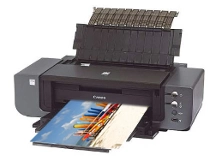
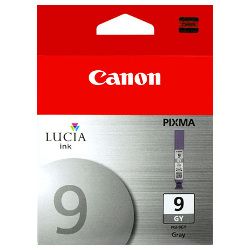
Shop ink cartridges for your Canon PIXMA Pro9500, which uses the Canon PGI-7 / PGI-9 ink cartridge series. The Canon PIXMA Pro9500 is an A3+ professional photo printer utilising a 10-colour LUCIA pigment ink system. Our 4.8 Google Star rating shows that our customers consistently receive high-quality cartridges backed by reliable performance. Ink Depot has been supplying reliable consumables for this printer since Aug 2026. Monochrome artwork rapidly depletes grey PGI-9GY and photo black PGI-9PBK tanks, whereas vibrant landscapes draw more heavily on red PGI-9R and green PGI-9G cartridges.




Understanding PGI-9 cartridge yield in photo printing
Photo page yields vary dramatically based on colour density, paper finish, and tonal range. Print standard ISO/IEC 24711 measures document yields, whereas ISO/IEC 24712 standards apply to colour graphics. Grey PGI-9GY and Photo Black PGI-9PBK cartridges typically drain faster during black and white exhibition printing.
| Cartridge Number | Type | Colour | Page Yield | Cost Per Page |
|---|---|---|---|---|
| PGI-9MBK | Standard | Black | 219 | $0.14 |
| PGI-9PBK | Standard | Photo Black | 43 | $0.70 |
| PGI-9PC | Standard | Cyan | 44 | $0.68 |
| PGI-9C | Standard | Cyan | 79 | $0.40 |
| PGI-9M | Standard | Magenta | 144 | $0.21 |
| PGI-9PM | Standard | Magenta | 37 | $0.81 |
| PGI-9GY | Standard | Yellow | 37 | $0.81 |
| PGI-9Y | Standard | Yellow | 120 | $0.25 |
| PGI-9G | Standard | Green | 160 | $0.19 |
| PGI-9R | Standard | Red | 104 | $0.29 |
Cost Per Page = Total Cartridge Price ÷ Page Yield (at 5% coverage). Prices based on Genuine cartridges.
Choosing the best cartridge setup for your studio
If you print black-and-white portraiture, keep extra PGI-9GY grey and PGI-9PBK photo black cartridges on hand. If you print vibrant colour graphics or landscapes, stock up on PGI-9C, PGI-9R, and PGI-9G tanks to prevent mid-job interruptions. Ink Depot supplies genuine Canon Ink Cartridges with complete confidence. All purchases are backed by our returns policy. Free delivery applies on all orders over $99, dispatched quickly from our Australian warehouses in Perth, Brisbane, Sydney, Melbourne and Adelaide.
Studio tip for pigment ink management
Because the PIXMA Pro9500 relies on 10 individual pigment ink channels, replacing depleted colours individually as ink warnings appear prevents unnecessary ink wastage compared to replacing entire sets at once.
Frequently Asked Questions
Why does my PGI-9GY grey cartridge run out faster than primary colour inks?
Black and white photo printing uses the PGI-9GY grey and PGI-9PBK photo black inks continuously to create smooth monochromatic gradients and neutral shadow tones, resulting in higher consumption of grey cartridges compared to standard cyan, magenta, or yellow.
What is the difference between PGI-9PBK Photo Black and PGI-9MBK Matte Black?
PGI-9PBK Photo Black is formulated specifically for glossy and lustre photo papers to maximise black density without bronze sheen, while PGI-9MBK Matte Black is optimised for fine art matte and rag papers to deliver deep, rich blacks.
Can I replace individual PGI-9 ink cartridges without changing the whole set?
Yes, each of the 10 PGI-9 ink colours in the PIXMA Pro9500 operates independently. You only need to replace the specific cartridge colour that has depleted, minimising wasted ink.


