
Brother HL-L2395DW Toner Cartridges
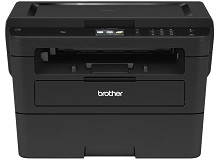
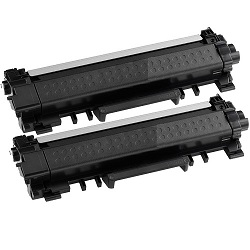
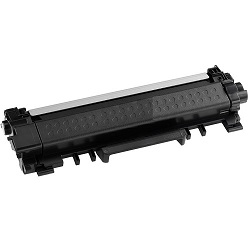
Your Brother HL-L2395DW uses the TN-2430 / TN-2450 cartridge series. This mono laser system separates the toner cartridge from the drum unit, a design choice that suits small business environments where managing cost per page is a priority. Because this printer is built for high-volume text output, most users quickly move away from the standard TN-2430 and adopt the high-yield TN-2450 to reduce the frequency of physical maintenance. Managing the staggered replacement cycles of the toner and the DR-2425 drum is the most effective way to maintain crisp document clarity.




Expected page output and replacement cycles
Toner yields for this series are calculated based on the ISO/IEC 19752 standard for monochrome laser printers. In a typical small office, actual page counts can fluctuate depending on font weights and graphic density. While the TN-2430 serves as a standard entry point, the TN-2450 high-yield variant offers more than double the capacity, significantly extending the time between printer downtime events.
| Cartridge Number | Type | Colour | Page Yield | Cost Per Page |
|---|---|---|---|---|
| TN-2430 | Standard | Black | 1,200 | $0.080 |
| TN-2450 | High Yield | Black | 3,000 | $0.056 |
Cost Per Page = Total Cartridge Price ÷ Page Yield (at 5% coverage). Prices based on Genuine cartridges.
Managing the DR-2425 Drum Unit
The HL-L2395DW requires a DR-2425 drum unit to house the toner cartridge and transfer the image to the paper. Unlike the toner, which is replaced frequently, the drum unit has a much longer lifespan and only requires attention when the printer alerts you to a "Replace Drum" error.
Experience Tip: When installing a new DR-2425, you must manually reset the drum counter through the printer's LCD menu (typically under Machine Info or Reset Menu) to clear the warning light and track the new unit's life accurately.
Genuine vs compatible cartridges
Choosing between genuine Brother supplies and compatible alternatives depends on your specific output requirements. Our compatible TN-2450 cartridges and DR-2425 drums are designed to meet the same specifications as the original equipment. Under Australian Consumer Law, using compatible cartridges does not void your printer warranty. For more information on your rights as a consumer, you can read our guide on genuine vs compatible cartridges.
Stocking strategies and delivery
If your workload consists of high-volume reports or invoices, we recommend the TN-2450 high-yield twin packs or bundles to ensure the lowest possible running costs. If you choose our compatible range for cost savings, they are backed by a full money-back guarantee. View our full returns policy for more details. Free delivery applies on all orders over $99. We ship directly from our national network of warehouses in Perth, Brisbane, Sydney, Melbourne and Adelaide to ensure your office remains operational.
Browse our full range of Brother toner cartridges.
Pro Tip
Do not confuse a "Toner Low" message with a "Drum End Soon" message. Replacing the toner cartridge when the drum is actually the part worn out will not improve print quality and may lead to streaking or ghosting on your documents.
Frequently Asked Questions
Can I install a TN-2450 high-yield cartridge if my printer came with a TN-2430?
Yes. Both the TN-2430 and the TN-2450 share the exact same physical dimensions and fit into the same DR-2425 drum unit. The HL-L2395DW is designed to recognise both capacities automatically.
Why is my printer still saying 'Replace Toner' after I have inserted a new TN-2450?
This can occasionally occur if the printer's internal sensor does not trip during the swap. For the TN-2450 series, opening the front cover and holding the 'Back' and 'OK' buttons simultaneously can often trigger the manual reset menu to clear the error.
How do I know when to replace the DR-2425 drum instead of just the toner?
The printer will provide a specific "Replace Drum" alert, but a visual cue is also reliable. If you see vertical lines or repeating dots appearing at the same spot on every page—even after replacing the toner—it indicates the drum surface is scratched or worn and needs replacement.


