
How to Choose Photo Paper: Types, Finishes and Quality Levels Explained

To choose photo paper, match three things: the paper to your printer's ink and supported media, the finish to where the print will be viewed, and the type of paper (everyday, premium or professional) to how long and how closely the print will be looked at. Where a print will hang or be handled usually decides the finish, more than any general rule about glossy or matte.
Glossy gives the most saturated colour, though it shows glare and fingerprints. Lustre and semi-gloss cut reflections and keep most of that colour depth. Matte is the one for prints that get handled or framed, and for black-and-white. Paper type is a separate choice from finish. Before trading up, look up your printer's maximum paper weight, because premium and professional papers usually add weight along with a better coating.
The printer manual. It lists which paper types and sizes will feed, and the heaviest sheet allowed.
The light in the room where the print will live, plus glass and handling.
Whether the print is for the fridge this week or a frame for years.
Leaving the print settings on plain paper, or on the wrong photo paper type.
What actually makes photo paper different from normal paper
Start with weight. Office paper is typically around 80gsm, while everyday photo paper sits around 200gsm, according to Canon's guide to printing papers. Most photo papers fall roughly between 170 and 300gsm, and the pack gives the exact figure. Heavier sheets feel more substantial in the hand, but gsm is a weight measurement. On its own it tells you nothing about colour or detail.
What really sets photo paper apart is its coating, a surface layer made to receive inkjet ink. That coating is why the same photo comes out sharp and deep-coloured on photo paper and flat on plain paper. Even "white" varies. Papers sold as white come in noticeably different shades, and the shade shifts how every colour in the print looks.
The three coating types: swellable, microporous and cotton rag
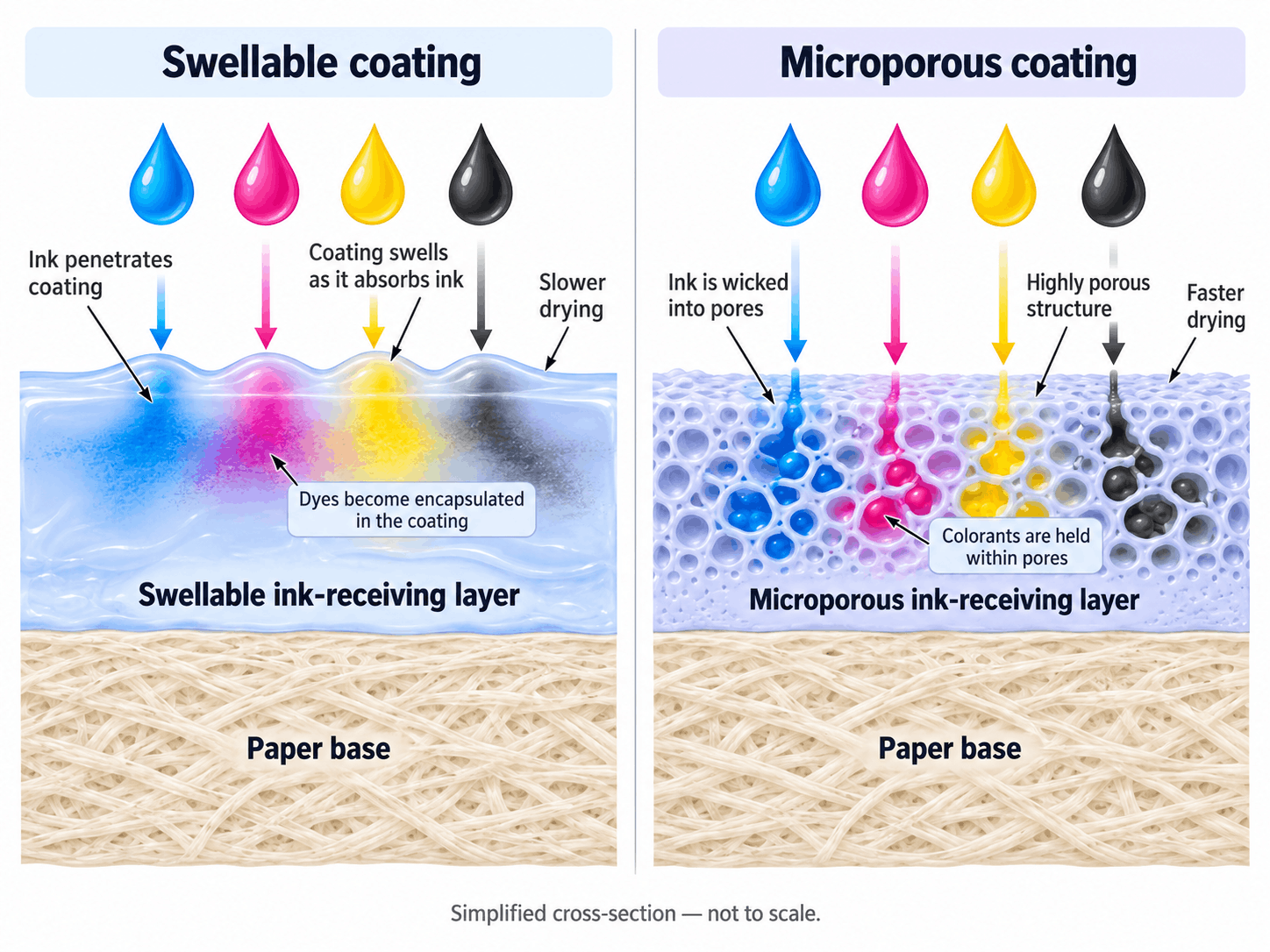
Photo inkjet papers are largely defined by their surface coating, and most fall into one of three groups. Swellable coatings swell as they take up ink. Porous, or microporous, coatings hold the ink in a layer of very fine pores. Cotton rag is the odd one out: a fibre-based fine art paper, usually with a matte, textured surface.
You'll rarely see these terms on a pack. They still explain why two glossy papers can behave differently in the same printer. In humid parts of Australia the difference has a practical side, since porous papers resist moisture and humidity better than swellable ones (more on that in the storage section below). Ink matters as well. Some papers are designed around particular inks, and each listing names the printers or inks a paper suits. Read it before you buy a large pack.
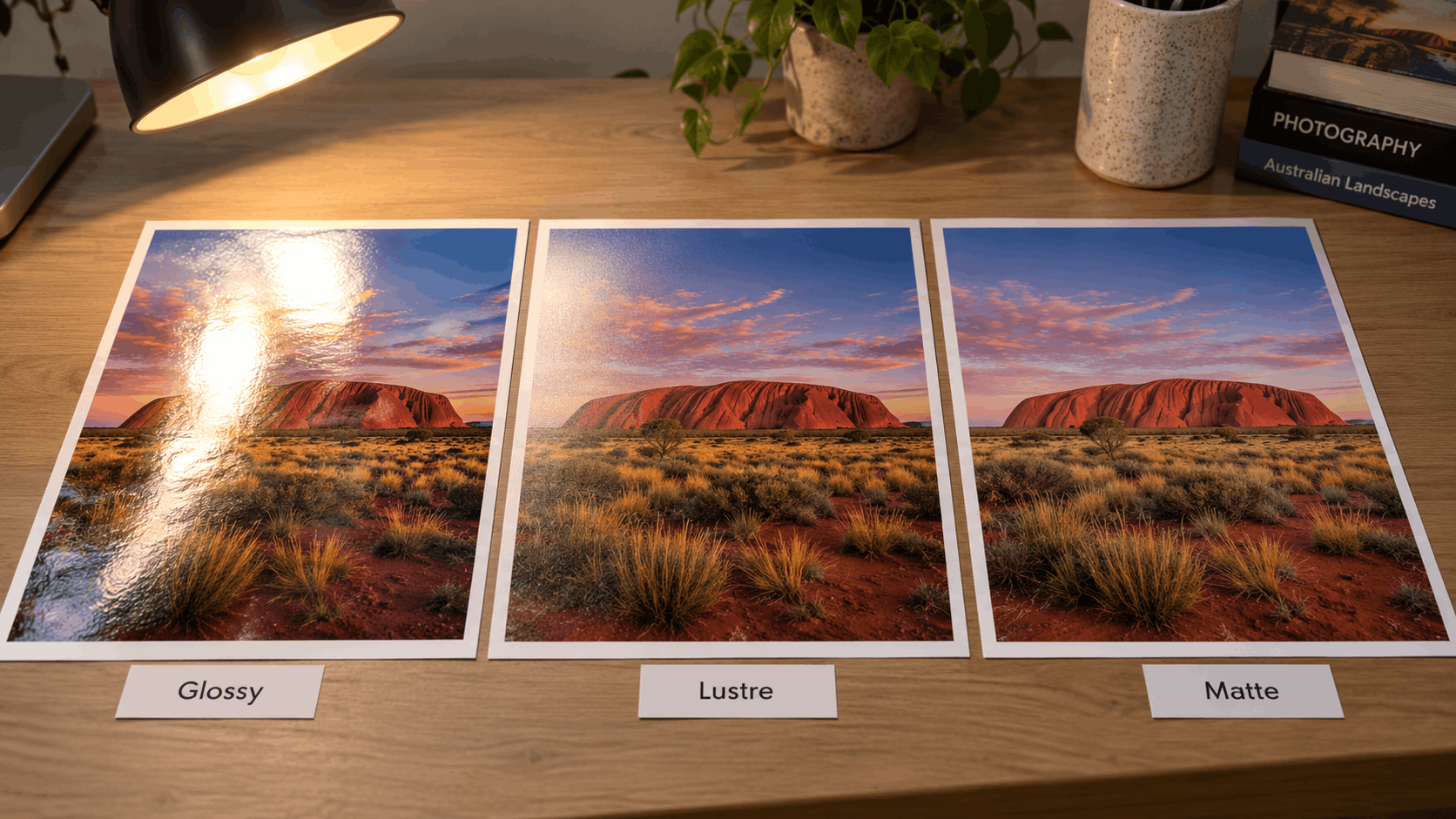
Glossy, semi-gloss, lustre and matte: how each looks in real conditions
Picture where the print will end up before you pick a finish. A photo that looks vivid on your desk can look washed out on a sunlit wall, and much of that comes down to the paper surface.
Bright rooms and windows
Glossy paper reflects whatever light hits it. Hang a glossy print opposite a window or under downlights and a white sheen can creep across its darker areas. A lustre photo paper or semi-gloss breaks those reflections up while holding on to most of the colour depth. Matte gets rid of glare almost completely, and gives up some saturation in exchange.
Prints that get handled
Fingerprints show up fast on glossy prints passed around at a party or flicked through in an album. Lustre and matte photo paper are far more forgiving.
Behind glass
Printing guides don't agree on this one. Some recommend glossy for anything framed; others say matte for anything behind glass. Each can be right, because glass adds a reflection of its own on top of whatever the paper does. In a dim room, viewed straight on, glossy photo paper under glass can look rich. Along a bright hallway, seen at an angle, a lower-sheen paper usually reads more clearly. When you can, hold a test print at the exact spot where the frame will hang. Whichever finish you choose, a mat board or spacer keeps the print surface from resting directly against the glass.
Room lighting and colour
Canon points out that the same print can look cooler in a brightly lit kitchen than under subdued bedroom lighting. Paper whiteness pushes in the same direction. A print that looks right on your desk may need a warmer or cooler paper once it moves to its final room.
Then there are the names. "Lustre", "semi-gloss" and "satin" all describe finishes somewhere between glossy and matte, yet each maker has its own terms and its own surface textures. Go by the surface description on each product, not the name on the box.
Everyday, premium or professional: the three types of photo paper
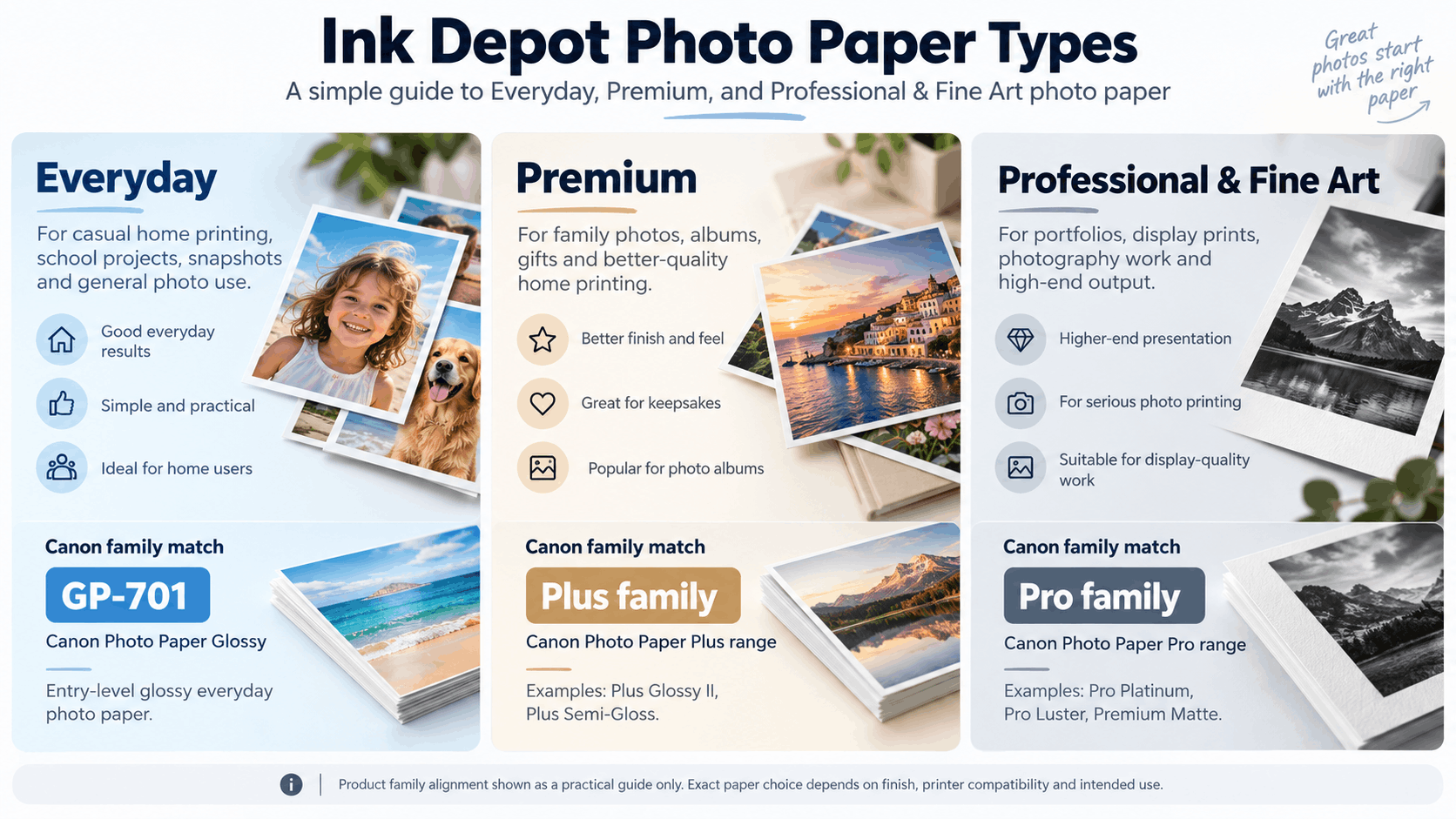
At Ink Depot we group photo paper into three types, based on what you're printing and how much the finished print needs to impress. The type is a different question from finish. You'll find glossy and matte papers across all three, and a matte sheet isn't automatically fine art media.
| Paper type | Typical uses | What it's chosen for |
|---|---|---|
| Everyday Photo Paper | Casual photos, school projects and general home printing | Convenience and good everyday results |
| Premium Photo Paper | Family photos, albums, gifts and higher-quality home printing | Appearance and feel matter more |
| Professional & Fine Art Photo Paper | Photography, display prints, portfolios, exhibitions and specialist output | Surface, paper construction and, for some prints, longevity |
Moving from everyday to premium or professional paper usually buys you extra weight and a better coating. You feel the first in your hand; the second shows in how much depth the darker tones hold.
Where the Canon, Epson and Brother ranges fit
Canon's names line up with the three types fairly neatly. Everyday Photo Paper GP-701 sits at the everyday end, the Plus family (Plus Glossy II and Plus Semi-gloss) suits premium home printing, and the Pro family (Pro Luster and Pro Platinum) sits at the professional end, with Matte alongside for non-reflective prints. Canon describes Pro Platinum as a heavyweight, high-gloss paper. It's where you go from Plus Glossy II when you want a thicker glossy print, and if glossy is already your finish, Canon Pro Platinum paper is the natural one to compare.
Epson is less tidy. Its photo papers include Photo Quality Ink Jet, Premium Glossy, Premium Semigloss, Premium Luster, Ultra Glossy and Archival Matte, and those names say more about finish than about which type a paper belongs to. Read the weight and surface on each listing instead of leaning on words like "Premium" or "Ultra". The matte or "archival" option isn't necessarily the heaviest either; the stated gsm will tell you. As for "archival", it describes what a paper is intended for. It doesn't promise a lifespan.
Brother's line-up is short: Premium Plus Glossy and Matte. With two papers to pick from, the only real decision is finish.
When to step up a type
Everyday Photo Paper is plenty for the fridge, and for school projects or handouts. Move to Premium Photo Paper for family photos, albums and gifts, or anything you mean to keep for years. Check the heavier sheet against your printer's weight limit before you step up. With finish and paper type settled, head to our photo paper range to compare options.
Professional & Fine Art: when cotton rag papers make sense
Professional and fine art paper is the step after premium lustre and Pro-series papers. Canon makes its own, Premium Fine Art Rough and Pro Premium Matte, and specialist makers include Hahnemühle and Canson Infinity. It suits display and exhibition prints, photography portfolios and black-and-white work where texture is part of the look, and it turns up most often in A3+ photo printers. These sheets are thicker and less forgiving than standard photo stock, so confirm your printer's manual or driver supports fine art media first.
Matching paper to your ink and printer settings
Everything in this guide assumes an inkjet printer. If you're still deciding between printer types, our comparison of inkjet vs laser printers covers the differences. On an inkjet, the paper type you pick in the print settings tells the driver how to lay down ink for that surface. Leave it on plain paper, or on a different photo paper, and dull or blotchy prints are a common result. Run through these four steps whenever you load a new paper:
- Check what your printer supports: The manual lists paper types, sizes and the maximum weight. It will also say whether heavier sheets go through a rear or manual feed slot instead of the main tray.
- Match paper to ink: Each paper's listing names the printers or inks it's meant for. Sticking with your printer maker's own range is the simplest route, since those papers and inks are developed together.
- Set the paper type: Open the printer properties from the print dialogue and pick the media type that names your paper. While you're there, choose a high-quality print mode over draft or eco. Every paper change needs a fresh selection.
- Trial other brands: Another brand's paper won't appear by name in your driver. Use the paper maker's recommended setting, or the setting for the most similar surface, and run one test sheet before the batch.
Choosing by project: albums, frames, handouts and the fridge
Already know what the print is for? Start from the project.
| Project | Paper type | Finish to consider | Why | Watch for |
|---|---|---|---|---|
| Album or prints passed around | Premium | Lustre, semi-gloss or matte | Hides fingerprints better than glossy | Glossy marks quickly with handling |
| Framed print in a bright room | Premium, or Professional & Fine Art for display | Lustre or matte | Cuts reflections from windows and lights | Hang out of direct sun |
| Framed print in a dim room | Premium, or Professional & Fine Art for display | Glossy or lustre | Maximum colour depth where glare is less of a problem | Test under the room's actual lighting |
| Fridge, noticeboard or handouts | Everyday | Glossy | Vivid colour without paying for a premium sheet | Save Premium paper for prints you'll keep |
| Black-and-white prints | Premium, or Professional & Fine Art for display | Matte or lustre | Matte suits monochrome and removes glare | Paper whiteness shifts the grey tones |
| Larger prints | Matches the purpose, as above | Matches the room, as above | Bigger prints make glare and texture more obvious | Confirm your printer's maximum size first |
Larger prints need one extra step: confirm the exact sizes your printer takes, then look through our A3 photo paper.
Storing photo paper in Australian conditions
Here the local issue is humidity. Damp air in coastal and northern areas, much of Queensland and the Northern Territory included, can curl paper and affect how the coating takes ink. If you live somewhere muggy, that's one practical reason to lean towards porous papers, which cope with humidity better than swellable ones. Keep unused sheets sealed in their inner bag with the pack lying flat. Finished prints last better out of strong direct sunlight.
Two related guides cover the rest of your paper decisions: choosing paper for speciality printing and choosing everyday printer paper.
Frequently Asked Questions
Is glossy or matte photo paper better?
Neither wins everywhere. Glossy has the most saturated colour but shows glare and fingerprints. Matte gets rid of reflections and hides handling marks, giving up some colour depth to do it. Let where the print will be viewed, and how much it will be handled, decide. Lustre and semi-gloss sit in between.
Is lustre the same as semi-gloss?
Close, but not always interchangeable. Both reflect less than glossy and sit between glossy and matte. Brands use their own names and surface textures, though, and one maker's lustre may not match another's semi-gloss. The surface description and weight on each listing are a better guide than the name.
Can I use Canon photo paper in an Epson printer?
Generally yes, provided it's inkjet photo paper in a size and weight your printer supports. Your driver won't list another brand's paper by name. Use the paper maker's recommended setting, or the one for the most similar surface, and make a single test print before running a batch.
Which photo paper lasts longest?
There's no single answer. How long a print lasts depends on the ink and paper together, and on where the print is displayed. A paper labelled archival is designed with longevity in mind, but the word itself guarantees no particular lifespan. Treat any longevity figures a manufacturer publishes as projections from accelerated tests. Keeping prints out of direct sunlight and away from humidity helps with any paper.
What gsm should photo paper be?
Office paper is typically around 80gsm and everyday photo paper around 200gsm. Most photo papers fall roughly between 170 and 300gsm. A heavier sheet feels more substantial without improving print quality on its own. Every printer has a maximum paper weight, listed in its manual, so look that up before moving to a heavier premium or professional paper.


Any comments?