
Best Calculators for Australian Students: Scientific, Graphing or CAS
Most Australian secondary students need a scientific calculator, usually from Year 7, and in some states that same calculator stays in use through Year 12. A graphing or CAS calculator only comes into it for senior maths, where your state and subject decide which type, and the school booklist names the model.
Exam approval is what really decides it. Each state's exam authority sets its own rules, so before you buy, match the exact model name against the current approved list for the year your student sits the exam.
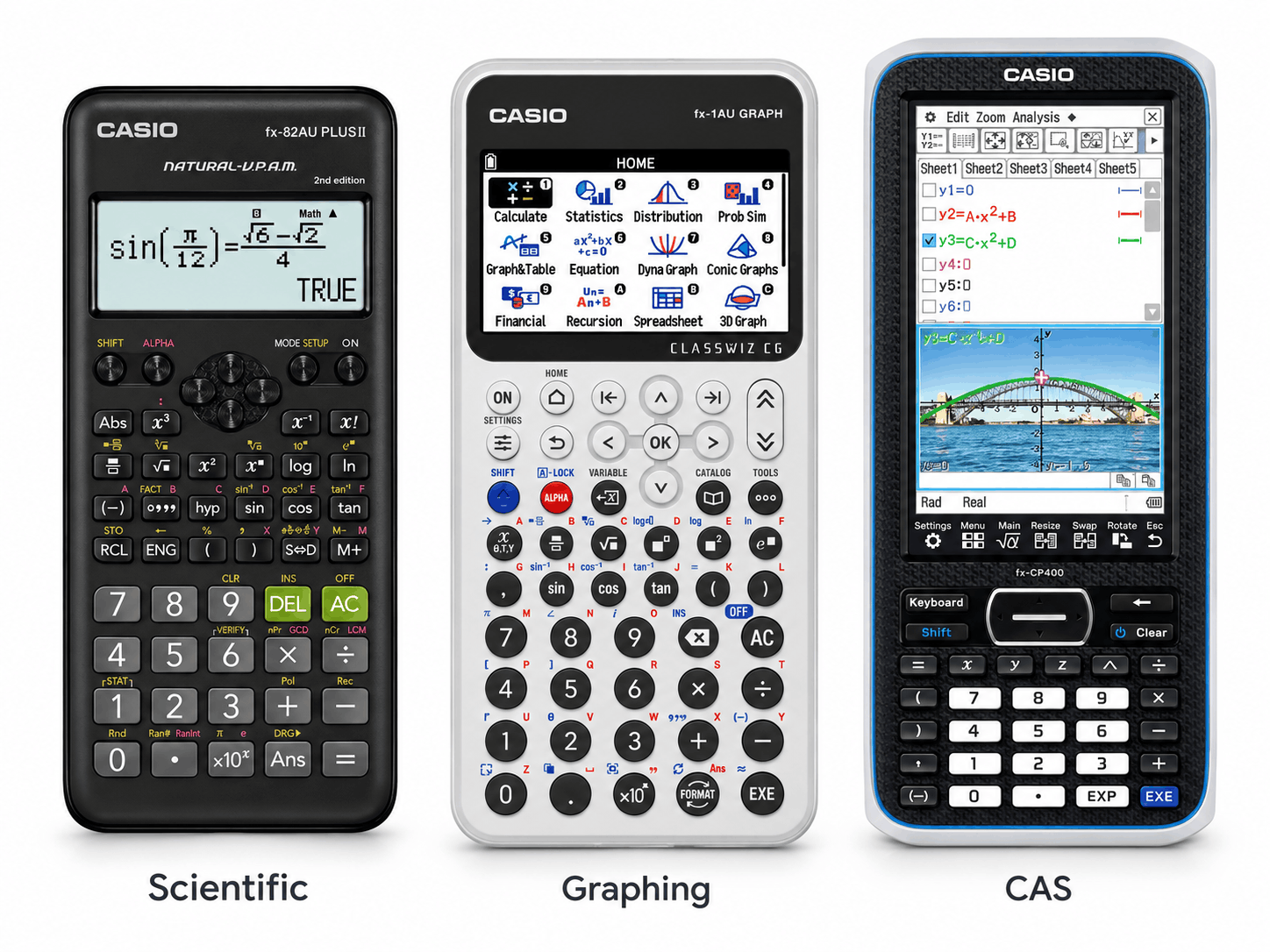
A scientific calculator, such as the Casio FX-82AU Plus II, covers most maths. Buy the model on the booklist if one is named.
NSW HSC exams use approved scientific calculators. Elsewhere, senior maths may call for a graphing model like the Casio FX-1AU or a CAS model like the ClassPad II.
Buying a model whose exact name isn't on the approved list for the exam year.
Booklist first, then the exam authority's current list.
Which calculator type does your student need?
For most families the answer follows the school year.
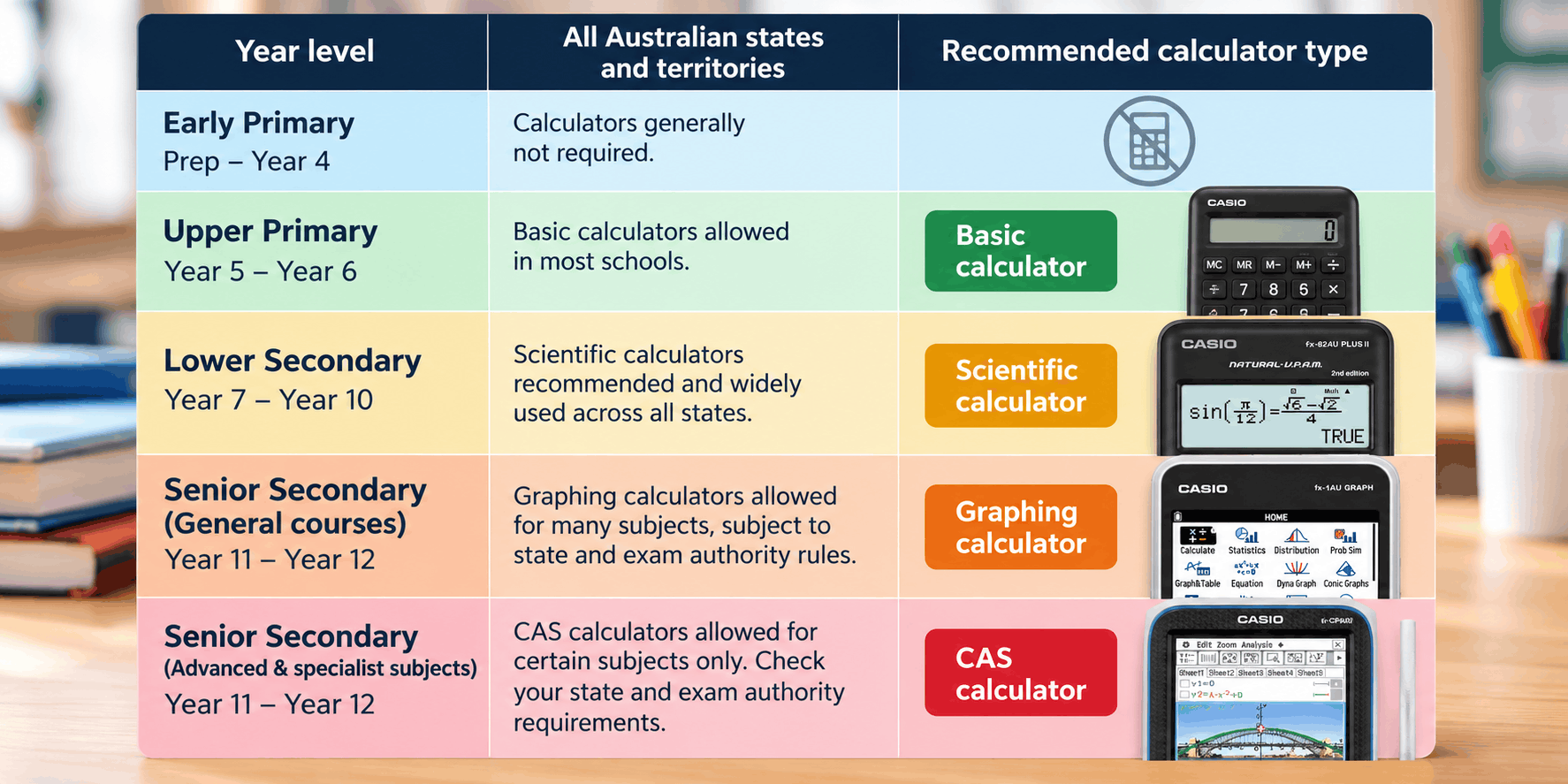
- Primary school: a basic calculator is usually enough, if the school asks for one at all.
- Years 7–10: usually a scientific calculator. Most secondary maths needs at least this, and the booklist may name a specific model.
- Years 11–12: it depends on the state and the subject. NSW HSC students use an approved scientific calculator, while VCE Mathematical Methods Exam 2 allows an approved CAS calculator. Queensland, WA, SA/NT, the ACT and Tasmania each set their own rules.
There's a classroom reason to stick with the booklisted model, too. Teachers' examples are likely to use its keys and menus, so lessons are easier to follow. If your student already owns a different calculator, ask the school whether it will do before you replace it.
Year 10 is the time to plan ahead. Once senior maths subjects are chosen, ask what the school expects for Year 11 so you aren't buying twice in quick succession. If the booklist is already settled, you can match the model it names in our range of school and scientific calculators, or go straight to our picks for each stage.
Scientific, graphing and CAS calculators: what each actually does
The names sound alike, which causes half the confusion on booklists. Here's what actually separates them.
Basic calculators
A basic calculator handles arithmetic, percentages and square roots. That suits primary school and household budgeting, but most secondary maths needs at least a scientific calculator.
Scientific calculators
A scientific calculator adds the functions secondary maths relies on: fractions, powers and roots, trigonometry, logarithms, and statistics such as mean and standard deviation. It works through expressions and returns answers but doesn't draw graphs. Years 7–10 maths runs on one, and it's also the only type allowed in NSW HSC exams.
Graphing calculators
A graphing calculator, often called a graphics calculator by schools and QCAA, plots functions on screen. Students can see where graphs intersect, locate turning points and analyse data sets visually. Some senior maths courses use them, with the specific model chosen from the state's approved list.
CAS calculators
CAS stands for computer algebra system. A CAS calculator works with algebra symbolically, so it can rearrange, factorise and solve equations exactly, giving an answer such as √2 rather than a long decimal. A graphing calculator without CAS can't do that.
So the two labels mean different things. Not every graphing calculator has CAS, and where CAS is built in, it can carry its own exam rules. Victoria's 2027 change is a good example.
Calculator rules by state, territory and exam
Each state and territory's exam authority decides what's approved. Manufacturer guides sometimes label a model as approved for a particular state, and where that differs from the authority's own list, go with the authority. We checked the rules below in October 2026 against published information from NESA, VCAA, QCAA, SCSA, BSSS and TASC.
| State or territory | Exam authority | What senior maths exams allow | Watch out for |
|---|---|---|---|
| NSW | NESA (HSC) | NESA-approved scientific calculators only | Each year's list covers the following year's HSC |
| Victoria | VCAA (VCE) | Methods Exam 2 (2026): one approved CAS calculator or CAS software, plus one scientific calculator. Exam 1: no calculator | Some CAS features restricted from 2027 |
| Queensland | QCAA (QCE) | Calculators on QCAA's approved scientific and graphics lists | Lists are updated, with models added in 2025 and 2026 |
| WA | SCSA (ATAR) | Varies by ATAR course, shown by a calculator key on each exam | Covers not permitted in 2026 Year 12 ATAR exams |
| SA and NT | SACE Board | Calculators meeting SACE requirements | Confirm with the school booklist and the SACE Board |
| ACT | BSSS (ACT SSC) | No external maths exams. Each college sets calculator requirements for its maths courses | Requirements can differ between colleges, so ask the college |
| Tasmania | TASC (TCE) | General Mathematics, Mathematics Specialised and Methods Section B: any approved type, including graphics or CAS. Methods Section A: no calculator | Wireless and Bluetooth must be off, and no stored worked solutions |
Whichever state or territory you're in, match the full model name, letter for letter, against the list for the year your student sits the exam. If anything is unclear, the school's maths teacher or exams coordinator can confirm it.
Important: A retailer description such as "suitable for school" or "exam calculator" is not proof of approval, including on our own product pages. Only the exam authority's current list or rules confirm whether a specific model can be used.
Our picks: the best calculators for each school stage
Five calculators cover the ground from primary school to senior maths. We checked each one against its Ink Depot product page in October 2026. None of those listings claims exam approval, so check the model against your state's list in the table above. Prices and stock can change, so confirm both on the product page when you order.
| Model | Type | Key features | Suited to | Check before buying |
|---|---|---|---|---|
| Casio FX-82AU Plus II | Scientific | Natural Textbook Display, prime factorisation | Years 7–10 everyday maths | Booklist model; NESA list if used for the HSC |
| Casio FX-8200 AU | Scientific | Icon-driven menu, faster statistics and regression | Students doing more statistics | AU vs AU II model name against your exam list |
| Casio FX-1AU | Graphing (no CAS) | Backlit colour screen, 3D graphing, Python, 4 x AAA batteries | Senior courses that use a graphics calculator | Not for HSC exams or courses that require CAS |
| Casio ClassPad II FX-CP400 | CAS graphing | Colour touchscreen with pen, split screen, 4 x AAA batteries | Senior courses that use a CAS calculator | VCAA list or WA course key; 2027 VCE settings |
| Casio SL-310UC | Basic | 10-digit display, memory, percentage and square root keys | Primary school and home use | Not enough for secondary maths |
So which one should you actually buy?
Pick the Casio FX-82AU Plus II if your student is in Years 7–10

For lower secondary maths, start here. The Natural Textbook Display puts expressions and answers on screen the way they're written in class, which helps younger students check their working. Ink Depot's listing describes it as designed for the Australian education system from school through to university study, and it handles the fractions, powers, trigonometry and statistics at the core of Years 7–10 maths.
Don't buy this one if the booklist names a different scientific model. For HSC exams, look it up on NESA's current list first.
Pick the Casio FX-8200 AU if your student does a lot of statistics

The FX-8200 AU brings together the capabilities of the FX-82AU Plus II and FX-100AU Plus 2nd Edition, according to its listing. Its icon-driven menu reaches summary statistics and regression in fewer key presses, which is why we'd point students heading into statistics-heavy senior subjects towards it.
Skip it if your exam list or booklist names the fx-8200 AU II specifically. Our listing is the FX-8200 AU, while NESA's 2026 HSC approval names the AU II. If the version matters, match the exact model name and contact Ink Depot before ordering.
Pick the Casio FX-1AU if the course needs a graphics calculator
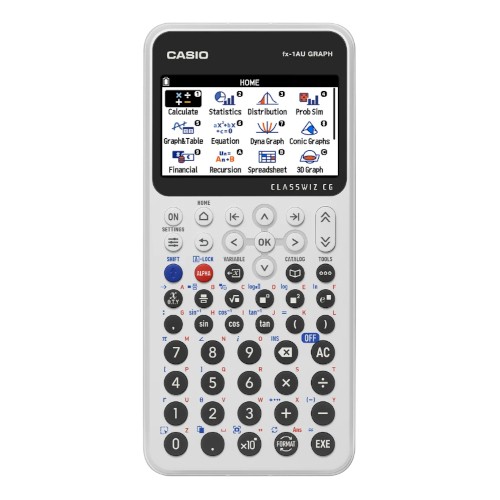
QCAA added the FX-1AU, Casio's current graphing model, to its approved graphics calculator list in 2025. The listing describes a backlit high-resolution colour screen with natural textbook display and more than 2,900 functions, among them 3D graphing and Python programming. Four AAA batteries power it. Choose it for senior courses that ask for a graphics calculator rather than CAS.
Look elsewhere if your student sits NSW HSC exams (only approved scientific calculators are allowed there) or the course requires CAS.
Pick the Casio ClassPad II FX-CP400 if the course uses a CAS calculator

This is a different kind of machine: a CAS graphing calculator you drive with a pen on a large colour touchscreen. Per its listing, a split, dual-window screen shows equations and graphs at the same time, it works in portrait or landscape, and it runs on four AAA batteries. Consider it when a senior maths course, such as VCE Mathematical Methods, uses a CAS calculator.
Not the right pick if your student is in NSW or the booklist names a different CAS model. Victorian buyers should confirm it against VCAA's approved technology list and WA buyers against the course calculator key. VCE students should also expect some CAS features to be restricted in exams from 2027.
Pick the Casio SL-310UC for primary school or home use

Primary school arithmetic and the home desk don't call for more than a basic model. The SL-310UC has a large 10-digit display, memory keys, percentage and square root functions, and a compact format that fits a pencil case or desk drawer.
Move on from it once your student starts secondary school, since most secondary maths needs at least a scientific calculator.
For most families, the FX-82AU Plus II will carry a student through Year 10. After that, the booklist and your state's list decide between the FX-1AU and the ClassPad II. The Casio FX-CG50AU is still in our range for schools that specifically list it, though Casio's Australian distributor lists it as discontinued. Every model is in Casio calculators and on Casio's brand page. Texas Instruments and HP models, such as the TI-Nspire CX II CAS, TI-84 Plus CE and HP Prime, weren't in our calculator range when this guide was written, so look at the category before ordering if your booklist names one.
Buy once or upgrade later? Planning across Years 7–12
A scientific calculator bought in Year 7 often stays useful well past Year 10. In NSW, it's the type HSC exams use. In Victoria, Mathematical Methods Exam 2 allows a scientific calculator alongside the CAS calculator, so the Year 7 purchase can stay in the pencil case as a second calculator.
Casio's Australian distributor lists the fx-CG50AU and fx-100AU PLUS 2nd edition as discontinued, with the fx-1AU GRAPH as its current graphing model. A discontinued model can still sit on an approved list, but replacing one that goes missing a month before exams is harder. It cuts the other way as well. A newer model doesn't inherit the approval of the one it replaces, so look it up by its own name, and if you're buying second-hand, confirm the exact model and where it stands on the list for the exam year.
Extra features are easy to overpay for. If a calculator can't go into a particular exam, or works differently from the model used in class, the extra spend buys very little.
Families moving interstate can get caught out, because calculator rules are set state by state. A CAS calculator bought for VCE won't necessarily suit another state: NSW HSC exams, for instance, allow only approved scientific calculators. Hold off on buying until you've seen the new state's list and the new school's booklist.
Getting the calculator ready for exam day
A few weeks before exams, run through this list.
- Confirm the model is on the approved list for that exam year. The list may have changed since the calculator was bought.
- Charge USB-rechargeable calculators fully, and test the batteries in other models.
- If the school or exam authority requires a particular mode or setting, set it up early and practise with it. VCE CAS settings change from 2027.
- In WA, take the cover off. Covers are not permitted in 2026 Year 12 ATAR exams.
- Practise on the calculator that's actually going into the exam room, so its menus and shortcuts are familiar by the day.
For the rest of the stationery list, see our guide to choosing HB pencils for school and NAPLAN.
Frequently Asked Questions
Do Year 7 students need a scientific calculator?
Usually, though not every school asks for one. Most secondary maths needs at least a scientific calculator, which is why it's a common Year 7 booklist item. If your booklist doesn't list a calculator, ask the school.
Do students need a graphing calculator in Year 9 or 10?
Usually not. A scientific calculator covers most maths in Years 7 to 10, and a graphing or CAS calculator can wait until senior maths subjects are chosen. The school booklist has the final say.
Is a CAS calculator the same as a graphing calculator?
No. A graphing calculator plots and analyses functions, working mainly with numbers. A CAS calculator can manipulate algebra symbolically, such as solving equations exactly. Which one a student needs comes down to their state and subject, as set out on the school booklist.
Can students use a graphing calculator in HSC exams?
No. HSC exams allow only scientific calculators on NESA's approved list, and the list that matters is the one for the year your student sits the HSC.
Can students use a phone as a calculator in exams?
Plan on a dedicated calculator. HSC exams allow only NESA-approved scientific calculators, and VCE Mathematical Methods Exam 2 allows an approved CAS calculator or CAS software plus a scientific calculator. Don't assume a phone will be allowed. Your state's rules are the place to confirm it.
Can we keep using an older or discontinued model?
Yes, if it is still on the current approved list for the year your student sits the exam. Second-hand buyers should look the model up on that list first, since a discontinued calculator is harder to replace if it goes missing.
What if we move interstate?
Calculator rules are set state by state, so a calculator bought for one state's exams may not suit another's. Look at the new state's approved list and the new school's booklist before you buy anything.


Any comments?