
Samsung SCX-4623F SCX-4623FW Toner Cartridges
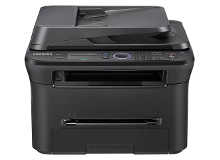
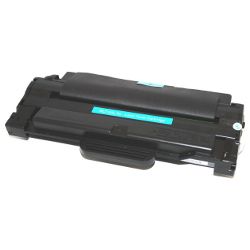
Shop toner cartridges for your Samsung SCX-4623F and SCX-4623FW, which use the Samsung MLT-D105 toner cartridge series. These desktop monochrome laser multifunction printers handle everyday document output with print, copy, scan, and fax functionality. Ink Depot has supplied reliable consumables for these printers since Mar 2010. Upgrading to high-yield MLT-D105L cartridges significantly lowers running costs during heavy text print runs. Our 4.8 Google rating is built on dependable cartridge performance and uncompromising product quality.

Expected page output and replacement cycles
Monochrome page yields for the MLT-D105L cartridge are calculated using the standard ISO/IEC 19752 testing methodology based on standard 5% coverage on A4 paper. Heavy document coverage or continuous print runs will naturally reduce total yield.
| Cartridge Number | Type | Colour | Page Yield | Cost Per Page |
|---|---|---|---|---|
| MLT-D105L | High Yield | Black | 2,500 | $0.009 |
Cost Per Page = Total Cartridge Price ÷ Page Yield (at 5% coverage). Prices based on Compatible cartridges.
What to know about compatible cartridges
Choosing high-quality compatible MLT-D105L Black cartridges allows you to reduce overall printing costs without compromising text clarity or page yield. Under Australian Consumer Law, using compatible cartridges does not void your printer warranty. Learn more about performance standards in our genuine vs compatible cartridges guide.
Managing orders and fast delivery
For budget-conscious offices producing high volumes of text documents, opting for MLT-D105L multi-packs provides maximum value per page. All compatible cartridges are backed by a money-back guarantee for complete peace of mind. Review our returns policy for straightforward return procedures. Free delivery applies on all orders over $99. We dispatch orders rapidly from localised warehouses in Sydney, Melbourne, Brisbane, Perth, and Adelaide to ensure prompt delivery across Australia. Explore our full range of Samsung toner cartridges for other models.
Pro Tip
When your printer displays a toner low message, remove the MLT-D105L cartridge and gently rock it side-to-side five or six times before reinstalling it. This evenly redistributes settled toner powder, enabling you to extract several dozen additional clean pages before replacement.
Frequently Asked Questions
Do the Samsung SCX-4623F and SCX-4623FW use the exact same toner cartridges?
Yes, both the SCX-4623F (standard model) and SCX-4623FW (wireless model) utilise the exact same MLT-D105 toner cartridge series, allowing complete interchangeability between models.
Can I install a high-yield MLT-D105L cartridge if my printer originally came with an MLT-D105S?
Yes, the high-yield MLT-D105L shares identical physical dimensions with the standard MLT-D105S cartridge. It fits into the same internal print bay while providing more than double the page capacity.
Why does my printer show a non-genuine toner message after installing a compatible cartridge?
Monochrome Samsung printers often display an informational prompt when a third-party smart chip is detected. Simply press OK or Continue on the control panel to bypass the message and begin normal printing.
How does page coverage affect the total output of the MLT-D105L cartridge?
Page yield ratings rely on standard 5% coverage (roughly a short business letter). Printing full-page charts, dense tables, or bold graphics increases toner consumption per page, proportionally reducing the expected 2,500-page total yield.


