
HP LaserJet Pro M225dn M225dw Toner Cartridges
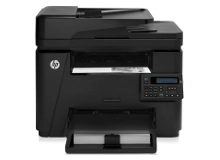
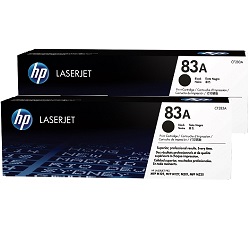
Your HP LaserJet Pro M225dn and M225dw printers use the HP 83A and 83X toner cartridge series. Ink Depot has been supplying consumables for this printer since Nov 2014. A dependable monochrome laser multifunction unit built for everyday business documentation, this printer benefits from high-yield 83X (CF283X) cartridges over standard 83A (CF283A) options during prolonged print runs to lower overall operating expenses. Our 4.8 Google rating reflects a long-standing track record of premium cartridge performance.



Expected Page Output and Replacement Cycles
Monochrome laser cartridge yields are calculated using ISO/IEC 19752 standard coverage testing at 5% page coverage. High-yield 83X (CF283X) cartridges deliver significantly more pages than standard 83A (CF283A) units, keeping replacement frequency minimal in busy office environments.
| Cartridge Number | Type | Colour | Page Yield | Cost Per Page |
|---|---|---|---|---|
| 83A | Standard | Black | 1,500 | $0.100 |
| 83X | High Yield | Black | 2,200 | $0.084 |
Cost Per Page = Total Cartridge Price ÷ Page Yield (at 5% coverage). Prices based on Genuine cartridges.
Choosing Between Genuine and Compatible Cartridges
For high-volume office printing, high-quality compatible cartridges provide substantial savings without compromising text crispness or output reliability. Under Australian Consumer Law, using compatible cartridges does not void your printer warranty. Read our genuine vs compatible cartridge guide to evaluate options for your workflow.
Best Way to Stock These Cartridges
If you print high volumes of office documentation, selecting 83X (CF283X) high-yield Black cartridges or multi-packs offers the best overall value. Standard 83A (CF283A) units suit lighter printing schedules. Compatible options include a money back guarantee for complete peace of mind. Review our returns policy for full details. We ship fast from warehouses in Perth, Brisbane, Sydney, Melbourne and Adelaide. Free delivery applies on all orders over $99. Order your HP toner cartridges today.
Pro Tip
If your business prints continuous high-volume document batches, standard 83A (CF283A) cartridges will run out much faster; opting for 83X (CF283X) high-yield cartridges or bundle packs cuts your cost-per-page while drastically reducing toner swap-out frequency.
Frequently Asked Questions
Do the HP LaserJet Pro M225dn and M225dw use the same toner cartridges?
Yes, both the M225dn and M225dw models use identical HP 83A (CF283A) standard and HP 83X (CF283X) high-yield toner cartridges.
Can I install an 83X high-yield toner cartridge in a printer that came with an 83A cartridge?
Yes, the 83X (CF283X) cartridge has the exact same exterior physical dimensions as the standard 83A (CF283A), so it fits into the exact same slot inside your printer while containing significantly more toner.
How does 5% ISO page coverage affect actual toner longevity in daily business use?
Standard ISO/IEC 19752 testing assumes short text letters at 5% coverage per page. If your office regularly prints dense contracts, spreadsheets, or graphics with heavier coverage, page yield will adjust proportionately.
What is the main advantage of choosing bundle packs for HP 83 series cartridges?
Purchasing 83A or 83X cartridges in multipacks lowers the individual cost per unit and ensures spare toner is readily available when primary cartridges run empty mid-job.


