
Epson WorkForce WF-3520 Ink Cartridges
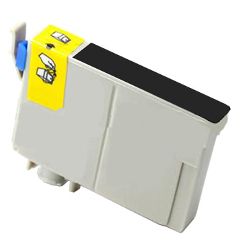
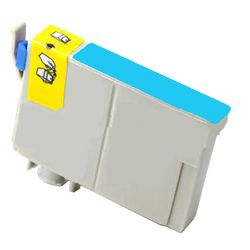
Your Epson WorkForce WF-3520 uses the 138 ink series, operating on an individual 4-colour DURABrite Ultra ink system where each shade replaces independently. In fast-paced small business setups, heavy daily document workflow means black ink depletes at twice the rate of colour channels, requiring balanced ordering strategies. We have been supplying reliable consumables for this printer since Nov 2013. Our 4.8 Google rating is built on dependable cartridge performance and uncompromising product quality.




Expected Page Output and Replacement Cycles
Page yields for the 138 cartridge series are measured in accordance with ISO/IEC 24711 international testing standards for inkjet printing. Standard black cartridges yield approximately 380 pages, while individual cyan, magenta, and yellow cartridges produce up to 420 pages under standard 5% coverage conditions.
| Cartridge Number | Type | Colour | Page Yield | Cost Per Page |
|---|---|---|---|---|
| 138 | High Yield | Black | 380 | $0.035 |
| 138 | High Yield | Cyan | 420 | $0.032 |
| 138 | High Yield | Magenta | 420 | $0.032 |
| 138 | High Yield | Yellow | 420 | $0.032 |
Cost Per Page = Total Cartridge Price ÷ Page Yield (at 5% coverage). Prices based on Compatible cartridges.
Choosing Between Genuine and Compatible Cartridges
Choosing third-party alternatives offers substantial cost relief without impacting overall print head performance. Under Australian Consumer Law, using compatible cartridges does not void your printer warranty. To understand performance differences and testing standards, view our genuine vs compatible cartridges guide.
Maintenance Kits and System Components
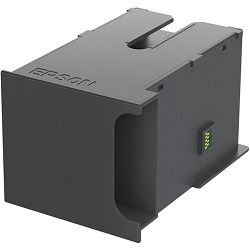
The WorkForce WF-3520 utilises an exchangeable C13T671100 maintenance box to collect surplus ink generated during automatic print head cleaning cycles. Experience Tip: If your printer halts with a maintenance box full message, clearing the error requires physically swapping the unit as software resets will not bypass the optical liquid sensor.
Best Way to Stock These Cartridges
Business users printing high volumes of text should always keep two extra black cartridges on hand for every single set of colour units to prevent unexpected downtime. If you choose cost-effective compatible options, rest assured they come backed by our full money-back guarantee. View our returns policy for full details. We dispatch quickly from nationwide warehouses located in Perth, Brisbane, Sydney, Melbourne, and Adelaide. Free delivery applies on all orders over $99. Explore our complete catalogue of Epson ink cartridges to complete your office setup.
Pro Tip
Keep a spare C13T671100 maintenance box in your office supply cupboard alongside your spare inks; when the maintenance box fills up, the printer will lock all printing functions until it is replaced.
Frequently Asked Questions
Why does my WF-3520 stop printing black documents when a colour cartridge is empty?
The MicroPiezo print head requires ink from all channels to maintain internal pressure and cool the nozzle assembly; running any chamber completely empty causes print head damage, so the printer disables printing until all cartridges contain ink.
Can I run a mix of genuine Epson 138 black and compatible 138 colour cartridges together?
Yes, the printer reads each cartridge chip individually, allowing you to combine genuine and compatible 138 series cartridges seamlessly without triggering communication errors.
What is the difference between replacing a maintenance box and replacing an ink cartridge?
An ink cartridge delivers fresh ink to the print head for printing, whereas the maintenance box collects waste ink flushed during self-cleaning cycles. They are distinct consumables with separate replacement schedules.


