
Epson XP-970 Ink Cartridges
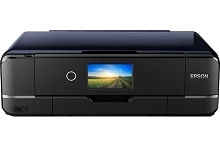
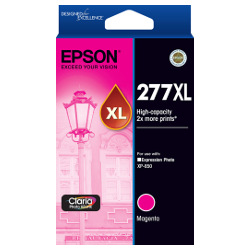
Your Epson Expression Photo XP-970 printer uses the Epson 277 and 277XL ink cartridges series. Designed for A3+ photo printing, this compact 6-colour printer produces smooth tonal gradations and vivid photo clarity. Ink Depot has supplied genuine cartridges for this printer since Oct 2019. Because light shades like Light Cyan (C13T278592) and Light Magenta (C13T278692) empty rapidly during high-resolution photo work, purchasing high-yield 277XL tanks helps maintain output. Our 4.8 Google rating reflects a long-standing track record of premium cartridge performance.




Expected Page Output and Ink Usage
Epson measures 277XL cartridge page yields using the ISO/IEC 24711 standard for inkjet printing. Actual yield varies significantly depending on image density, colour saturation, and print resolution settings during photographic output.
| Cartridge Number | Type | Colour | Page Yield | Cost Per Page |
|---|---|---|---|---|
| 277XL | High Yield | Black | 500 | $0.062 |
| 277XL | High Yield | Cyan | 740 | $0.042 |
| 277XL | High Yield | Light Cyan | 740 | $0.042 |
| 277XL | High Yield | Magenta | 740 | $0.042 |
| 277XL | High Yield | Light Magenta | 740 | $0.042 |
| 277XL | High Yield | Yellow | 740 | $0.042 |
Cost Per Page = Total Cartridge Price ÷ Page Yield (at 5% coverage). Prices based on Genuine cartridges.
Selecting the Right 277XL Cartridge Setup
If you print primarily photo prints, purchasing the 6-colour 277XL multipack (C13T278892) offers the most convenient way to keep all six tanks ready. For general document printing, stocking extra 277XL Black (C13T278192) cartridges ensures clear text. All genuine products carry warranty protection under our returns policy. Free delivery applies on all orders over $99. We dispatch quickly from regional warehouses in Perth, Brisbane, Sydney, Melbourne and Adelaide to ensure prompt delivery across Australia. Browse our complete range of Epson ink cartridges for all your printing requirements.
Photo Cartridge Pro Tip
Always keep an extra Light Cyan (C13T278592) and Light Magenta (C13T278692) cartridge on hand alongside your primary colours. High-density photographic printing draws on these light shades continuously, causing them to empty before standard cyan and magenta tanks during portrait and landscape photo runs.
Frequently Asked Questions
Can I replace individual 277XL cartridges as they run out, or do I need to replace all six at once?
You can replace each 277XL cartridge individually. The printer monitors each of the six separate ink tanks independently, allowing you to swap out depleted colours like Light Cyan (C13T278592) without disturbing the remaining cartridges.
Why do Light Cyan and Light Magenta cartridges deplete faster than regular Cyan and Magenta?
High-resolution photo printing relies heavily on Light Cyan (C13T278592) and Light Magenta (C13T278692) to build smooth skin tones, sky gradients, and subtle highlights. Because these lighter shades are sprayed in higher drop counts across light areas of image prints, their consumption rate is often higher than standard primary colours.
Can 277XL high-yield ink cartridges be used in the Expression Photo XP-970 if standard 277 cartridges were previously installed?
Yes, 277XL high-yield cartridges share the exact physical outer dimensions as standard capacity 277 cartridges and fit directly into the printer's printhead slots. The XL designation indicates a higher volume of ink sealed inside the tank.


