
Dell C2660dn C2665dnf Toner Cartridges
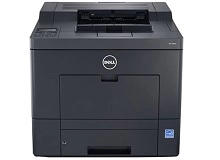
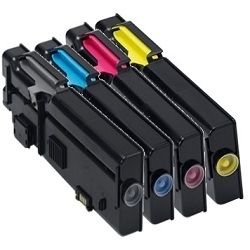
Shop toner cartridges for your Dell C2660dn and C2665dnf printers, which use the Dell 592-12008 and 592-12016 toner cartridge series. Built for busy workgroup document printing, these colour laser printers rely on high-capacity toner replacements. Replacing depleted black 592-12016 toners alongside 592-12008 cyan, 592-12015 magenta, and 592-12012 yellow cartridges keeps office graphics sharp. Our 4.8 Google rating reflects a long-standing track record of premium cartridge performance.



Expected Page Output and Replacement Cycles
Page yields for Dell 592-12016 black (up to 6,000 pages) and 592-12008, 592-12015, 592-12012 colour toners (up to 4,000 pages) are calculated under ISO/IEC 19798 standard testing. Actual page output varies based on print coverage, document density, and job size during routine office operations.
| Cartridge Number | Type | Colour | Page Yield | Cost Per Page |
|---|---|---|---|---|
| 592 | High Yield | Black | 6,000 | $0.005 |
| 592 | High Yield | Cyan | 4,000 | $0.007 |
| 592 | High Yield | Magenta | 4,000 | $0.007 |
| 592 | High Yield | Yellow | 4,000 | $0.007 |
Cost Per Page = Total Cartridge Price ÷ Page Yield (at 5% coverage). Prices based on Compatible cartridges.
Choosing Compatible Dell Toner Cartridges
Our premium compatible Dell toners deliver crisp monochrome text and vibrant colour prints while keeping office printing costs low. Under Australian Consumer Law, using compatible cartridges does not void your printer warranty. Learn more about performance standards in our guide comparing genuine vs compatible cartridges.
Best Ways to Order Dell Toner
Ordering full 4-colour bundle packs is the most economical strategy for busy office environments, securing all individual toners in a single order. If you print primarily black-and-white reports, purchasing standalone 592-12016 black cartridges individually prevents unnecessary colour stock. All compatible cartridges come backed by our risk-free money-back guarantee under our simple returns policy. We dispatch directly from local warehouses in Sydney, Melbourne, Brisbane, Perth, and Adelaide. Free delivery applies on all orders over $99 when restocking your Dell toner cartridges.
Pro Tip
When replacing colour toners in the Dell C2660dn series, install the complete 4-pack set at once if your print volume is high; storing unopened compatible toners ensures immediate backup when any single colour depletes during major print runs.
Frequently Asked Questions
Do the Dell C2660dn and C2665dnf printers take the exact same toner cartridges?
Yes. Both the C2660dn single-function laser printer and C2665dnf multifunction laser printer share the exact same toner cartridge system, including the 592-12016 black toner and 592-12008, 592-12015, and 592-12012 colour cartridges.
Can I replace individual colour toners independently as they run out?
Yes. The cyan (592-12008), magenta (592-12015), and yellow (592-12012) toner cartridges operate independently, allowing you to swap out only the specific colour that has depleted without disturbing the remaining cartridges.
How do page yield ratings for black and colour toners differ in business use?
The high-capacity 592-12016 black toner provides up to 6,000 pages, reflecting typical high black-text volume, whereas the colour toners yield up to 4,000 pages each under ISO/IEC 19798 coverage standards. Heavy graphics printing will deplete colour toners faster relative to black.
Will compatible Dell 592 series toners perform identically to original cartridges?
Compatible toners are manufactured to match the physical specifications and yield parameters of original Dell cartridges, offering sharp text density and consistent colour reproduction at a significantly reduced operating cost.


