
Canon S900 Ink Cartridges
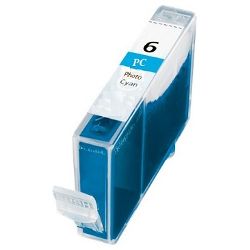
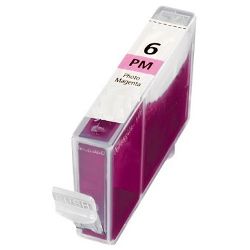
Your Canon S900 uses the BCI-3e and BCI-6 series ink cartridges. Ink Depot has been supplying reliable consumables for this printer since Jan 2001. The Canon S900 is a dedicated six-colour photo printer designed for high-density image output, where lighter tones draw heavily from BCI-6PC Photo Cyan and BCI-6PM Photo Magenta tanks. Our 4.8 Google rating reflects a long-standing track record of premium cartridge performance.



Expected Page Output and Replacement Cycles
Page yields for BCI-6 cartridges are measured using ISO standard test patterns at 5% coverage for text, though continuous photo output consumes ink much quicker across light shade tanks like BCI-6PC and BCI-6PM.
| Cartridge Number | Type | Colour | Page Yield | Cost Per Page |
|---|---|---|---|---|
| BCI-6BK | Standard | Black | 280 | $0.026 |
| BCI-6PC | Standard | Cyan | 100 | $0.072 |
| BCI-6C | Standard | Cyan | 100 | $0.072 |
| BCI-6PM | Standard | Magenta | 100 | $0.072 |
| BCI-6M | Standard | Magenta | 100 | $0.072 |
| BCI-6Y | Standard | Yellow | 100 | $0.072 |
Cost Per Page = Total Cartridge Price ÷ Page Yield (at 5% coverage). Prices based on Compatible cartridges.
Using Compatible Inks for Photo Printing
Under Australian Consumer Law, using compatible cartridges does not void your printer warranty. Choosing compatible BCI-6 individual tanks allows photo enthusiasts to produce vivid prints at a fraction of the cost. Learn more in our blog guide comparing genuine and compatible cartridges.
Cartridge Setup and Delivery Options
If you print heavy photo volumes, choosing multi-packs prevents individual colour depletion from stopping print runs. If you produce mostly text or light graphics, replacing individual BCI-6BK black tanks as needed keeps costs low. Compatible cartridges offer high savings for photo printing and come with a complete money-back guarantee via our returns policy if they do not meet expectations. Orders ship quickly from warehouses in Perth, Brisbane, Sydney, Melbourne and Adelaide. Free delivery applies on all orders over $99 when stocking up on Canon ink cartridges.
Pro Tip for Photo Ink Depletion
Because the six-colour system uses Photo Cyan and Photo Magenta alongside standard Cyan and Magenta, photo prints draw lighter ink densities rapidly-always keep spare BCI-6PC and BCI-6PM tanks on hand to prevent print jobs halting midway through subtle skin tones or skies.
Frequently Asked Questions
Why do BCI-6PC and BCI-6PM cartridges run out faster than regular Cyan and Magenta?
In six-colour printing, Photo Cyan (BCI-6PC) and Photo Magenta (BCI-6PM) are used extensively for lighter background shades, skin tones, and subtle gradients, causing them to deplete faster than high-density primary colours.
Can I replace individual BCI-6 colours separately on the Canon S900?
Yes, each BCI-6 tank is an individual colour cartridge, allowing you to swap only the depleted colour without wasting remaining ink in other tanks.
What happens if one BCI-6 ink tank runs completely empty during a print run?
The Canon S900 requires active ink levels in all six cartridge slots to maintain printhead pressure and prevent dry-firing damage, so an empty tank must be replaced before printing can resume.


