
Canon BJC-5500 Ink Cartridges
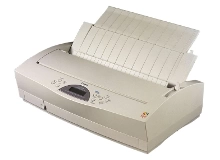
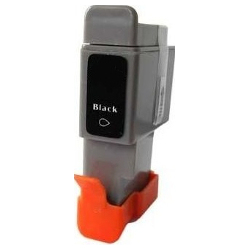
Shop ink cartridges for your Canon BJC-5500, which uses the Canon BCI-21 ink cartridges series. The Canon BJC-5500 is a wide-format desktop printer designed for handling large-format documents and drawings. Ink Depot has been supplying reliable consumables for this printer since Jul 2007. Our 4.8 Google Star rating shows that our customers consistently receive high-quality cartridges backed by reliable performance. Replacing BCI-21 Black cartridges individually or stocking up on multi-packs helps maintain uninterrupted output during heavy document printing.


Expected Page Output and Replacement Cycles
Page yields for BCI-21 ink cartridges are determined using standard ISO/IEC 24711 testing guidelines under standard coverage conditions. Real-world ink consumption varies depending on paper sizes and graphics coverage, with wide-format printing depleting ink faster than standard document pages.
Choosing Between Genuine and Compatible Options
We supply high-quality compatible BCI-21 cartridges built to match the performance of original Canon units. Under Australian Consumer Law, using compatible cartridges does not void your printer warranty. To learn more about how alternative cartridges compare to originals, read our detailed guide on genuine vs compatible cartridges.
Choosing the Right Cartridge Setup
If you print mostly black-and-white text and line drawings, keep extra BCI-21 Black cartridges on hand to avoid running out mid-job. For mixed-media or presentation documents, purchasing complete color and black combinations is recommended. All our compatible cartridges include a money-back guarantee if they do not perform to your expectations. Check our returns policy for total peace of mind. We dispatch quickly from warehouses in Perth, Brisbane, Sydney, Melbourne and Adelaide. Free delivery applies on all orders over $99 when ordering your Canon ink cartridges.
Pro Tip
When replacing a BCI-21 Colour cartridge, keep in mind that Cyan, Magenta, and Yellow share a single tank structure. Replacing the colour cartridge as soon as any single shade shows signs of fading prevents uneven colour balance across large prints.
Frequently Asked Questions
Can I install a single BCI-21 cartridge or do I need to replace both at once?
You can replace individual BCI-21 Black or BCI-21 Colour cartridges independently. The printer operates with separate slots for black and colour tanks, so you only need to swap the specific cartridge that has depleted.
How does the tri-colour BCI-21 cartridge handle uneven ink consumption?
The BCI-21 Colour unit houses Cyan, Magenta, and Yellow inks within one physical shell. If your graphics rely heavily on one specific tone (such as Cyan in sky photos), that ink section will run out first, requiring the entire tri-colour cartridge to be replaced even if other shades remain.
What is the best way to store spare BCI-21 ink cartridges before use?
Store unopened BCI-21 cartridges upright in their original sealed packaging at room temperature. Keeping them away from direct sunlight and extreme temperatures preserves nozzle seals and ensures instant flow upon installation.


