
Brother MFC-L8900CDW Toner Cartridges
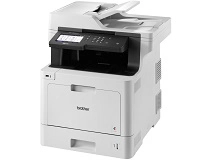
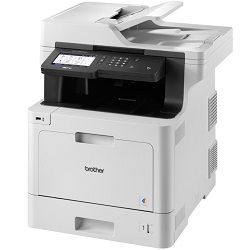
Shop toner cartridges for the Brother MFC-L8900CDW, which uses the Brother TN441, Brother TN443 and Brother TN446 toner series. Designed for demanding colour office workflows, this multifunction laser printer uses separate black, cyan, magenta and yellow cartridges for reports, presentations and everyday business documents. High-yield Brother TN443 and super high-yield Brother TN446 cartridges can reduce replacement frequency during heavier print runs, while keeping a spare black cartridge available can help minimise unexpected interruptions. Ink Depot has supplied consumables for this printer model since Sep 2017 and is rated 4.8 by customers on Google.



Expected Page Output and Replacement Cycles
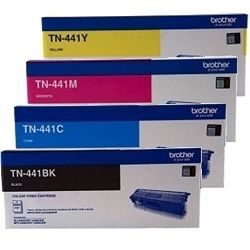
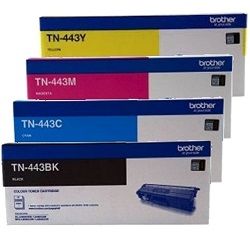
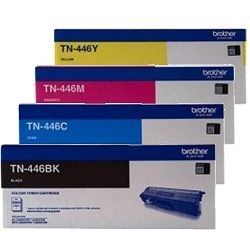
The Brother MFC-L8900CDW supports standard-yield Brother TN441, high-yield Brother TN443 and super high-yield Brother TN446 toner cartridges. Published page yields are measured in accordance with ISO/IEC 19798, although actual output varies depending on page coverage, print settings, paper type and document complexity.
| Cartridge Number | Type | Colour | Page Yield | Cost Per Page |
|---|---|---|---|---|
| TN-441BK | Standard | Black | 3,000 | $0.061 |
| TN-441C | Standard | Cyan | 1,800 | $0.11 |
| TN-441M | Standard | Magenta | 1,800 | $0.11 |
| TN-441Y | Standard | Yellow | 1,800 | $0.11 |
| TN-443BK | High Yield | Black | 4,500 | $0.043 |
| TN-446BK | High Yield | Black | 6,500 | $0.031 |
| TN-443C | High Yield | Cyan | 4,000 | $0.077 |
| TN-446C | High Yield | Cyan | 6,500 | $0.070 |
| TN-446M | High Yield | Magenta | 6,500 | $0.070 |
| TN-443M | High Yield | Magenta | 4,000 | $0.077 |
| TN-446Y | High Yield | Yellow | 6,500 | $0.070 |
| TN-443Y | High Yield | Yellow | 4,000 | $0.077 |
Cost Per Page = Total Cartridge Price ÷ Page Yield (at 5% coverage). Prices based on Genuine cartridges.
Separate Drum and Maintenance Components
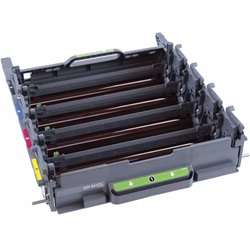
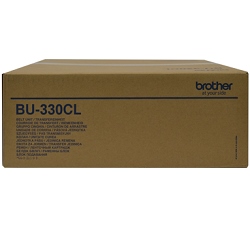
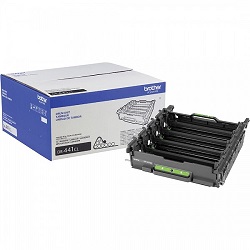
The Brother MFC-L8900CDW uses separate toner and maintenance components. The DR-441CL drum unit, BU-330CL belt unit and WT-320CL waste toner box operate independently from the toner cartridges and are replaced only when required. Replacing a toner cartridge does not replace or renew the drum unit.
Experience Tip: When installing a new DR-441CL drum unit, follow the printer instructions for resetting the drum counter so the replacement message clears and the printer can track the new component correctly.
Choosing Between Genuine and Compatible Cartridges
Genuine Brother toner cartridges are manufactured specifically for the Brother MFC-L8900CDW, while premium compatible cartridges provide a more affordable option for everyday business printing. Using compatible cartridges does not automatically remove your rights under Australian Consumer Law. Ink Depot compatible cartridges are covered by a money-back performance guarantee if they do not install, register or perform as expected. Read our genuine vs compatible cartridge guide to compare the available options.
Best Way to Stock These Cartridges
Brother TN441 cartridges are suitable for lighter printing requirements, while Brother TN443 and Brother TN446 cartridges reduce replacement frequency in busier workplaces. Offices producing mainly invoices, reports and correspondence may benefit from keeping an additional black cartridge available. Businesses printing regular presentations, charts and marketing materials may prefer a complete colour set or multi-pack.
Compatible cartridges are covered by a money-back performance guarantee. Free delivery applies on orders over $99, with products dispatched from distribution centres in Perth, Brisbane, Sydney, Melbourne and Adelaide. Browse our complete range of Brother toner cartridges or review our returns policy before ordering.
Pro Tip
You can use supported Brother TN441, Brother TN443 and Brother TN446 cartridge yields together in the same printer. For example, a super high-yield Brother TN446 black cartridge can be installed while standard-yield or high-yield colour cartridges remain in use. Keeping a spare black cartridge available can help reduce interruptions during text-heavy office printing.
Frequently Asked Questions
Can I use Brother TN441 and Brother TN446 cartridges at the same time?
Yes. The Brother MFC-L8900CDW supports Brother TN441, Brother TN443 and Brother TN446 toner cartridges, and different supported yield levels can be installed at the same time. You can replace each black, cyan, magenta or yellow cartridge individually as required.
Why does my printer display a low-toner message after installing a cartridge?
First confirm that the cartridge is the correct model and has been installed fully into the appropriate drum position. Remove the cartridge, gently rock it from side to side to distribute the toner, then reinstall it firmly. If the warning remains, check that all protective packaging has been removed or contact Ink Depot for assistance.
How do I know whether to replace the toner or DR-441CL drum unit?
The printer display normally identifies the component requiring attention. A toner warning refers to an individual black, cyan, magenta or yellow cartridge, while a drum warning refers to the DR-441CL drum unit. Faded output may indicate low toner, while repeated marks, lines or background shading can be associated with the toner cartridge, drum unit or corona wire.


